Category: CNC Machining

  • CNC Bit Maintenance: The Professional Guide to Sharpening, Cleaning, and Storage

    CNC Bit Maintenance: The Professional Guide to Sharpening, Cleaning, and Storage

    You’ve invested hundreds, perhaps thousands, of dollars into your tooling library. From the high-performance [Upcut vs. Downcut vs. Compression Bits: When to use each for edge finish] that power your roughing passes to the elite [Diamond Coated & Specialized Bits: For composites and abrasive materials] used for aerospace composites, these tools are the heart of your workshop. However, many operators treat bits as disposables. The reality is that the cost of neglect is far higher than the cost of upkeep.

    Proper CNC bit maintenance isn’t just about aesthetics; it’s about preventing “runout,” reducing spindle strain, and ensuring your centerpiece projects don’t fail due to a resin-clogged flute. In this comprehensive guide, we’ll cover the chemical, physical, and environmental pillars of tool longevity. This expertise is a core part of our [The Ultimate Guide to CNC Router Bits: Selection, Speeds, and Materials].


    1. The “Resin Trap”: Why Dirty Bits Actually Break
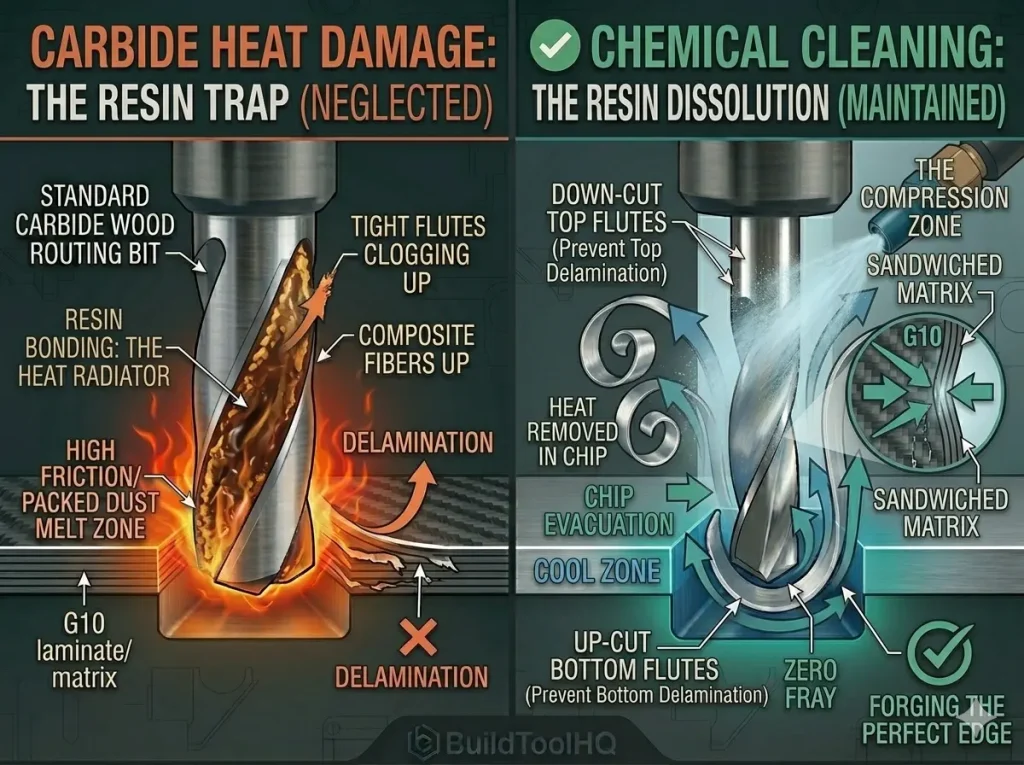
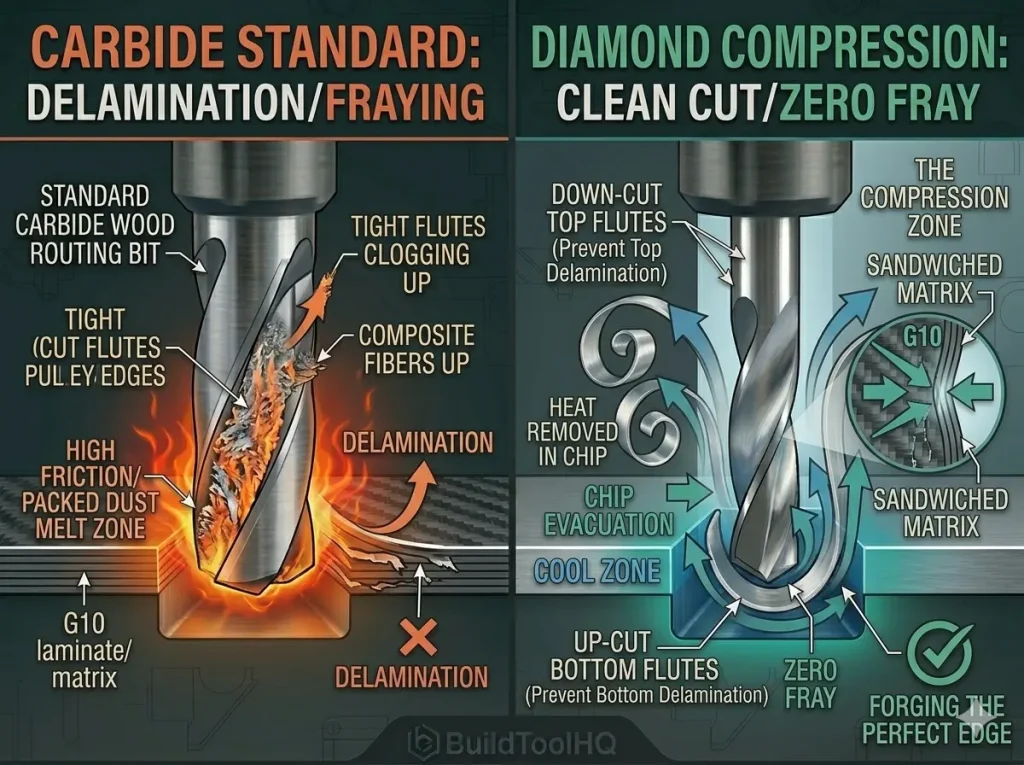
    Comparison diagram visualizing a standard standard upcut bit (left, orange) vs. a PCD diamond compression bit (right, teal) cutting a G10 composite, physically proving how the compression zone prevents top and bottom delamination fraying.
    Why compression is king: This technical diagram visualizes the victory. A standard 2-flute bit (left) quickly creates delamination fraying in G10. The diamond coated compression bit (right) uses top-down and bottom-up flutes to create "THE COMPRESSION ZONE." The exploded view (right) shows how this sandwiches the G10 core matrix together with support, allowing the PCD edge (from image_107.png) to slice the supported fibers cleanly, guaranteeing a zero-fray finish in abrasive materials with diamond coated CNC bits.

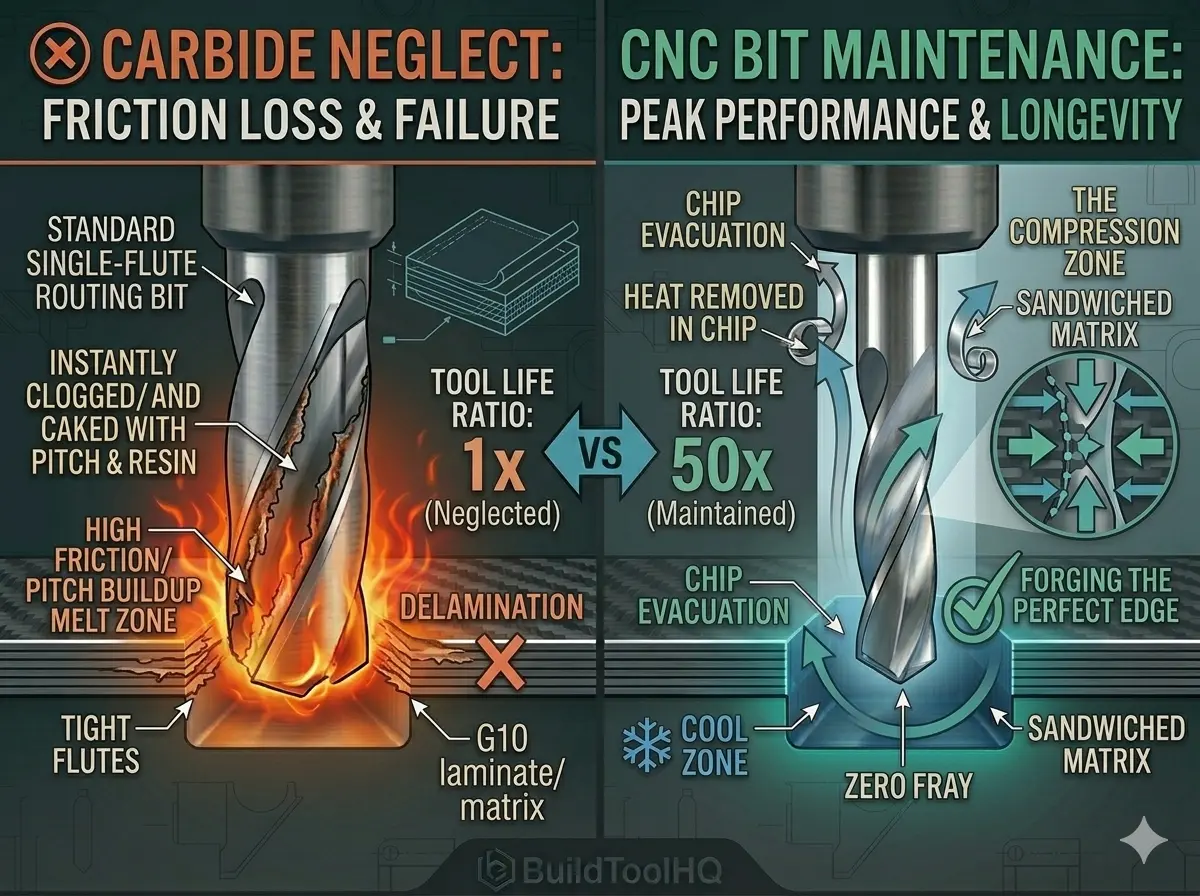
    The most common cause of premature tool failure isn’t actually a loss of sharpness—it’s pitch and resin buildup. When you cut softwoods like pine or even dense hardwoods like walnut and cherry, the friction of the cut melts the natural resins in the wood. These resins then bond to the carbide surface, making consistent CNC bit maintenance nearly impossible without intervention.

    The Friction Feedback Loop

    Once resin builds up in the “gullet” (the valley of the flute), it creates a catastrophic feedback loop:

    1. Increased Friction: The resin creates a sticky surface that prevents chips from sliding out.
    2. Heat Spikes: Because chips can’t eject (a principle we emphasize in [Aluminum Cutting with CNC: Single-flute secrets and lubrication]), they get re-cut, generating intense heat.
    3. Tempering Loss: This heat can eventually reach a point where it compromises the cobalt binder in your carbide, leading to a “cooked” bit that snaps under the slightest load.

    2. The Professional Chemical Cleaning Protocol

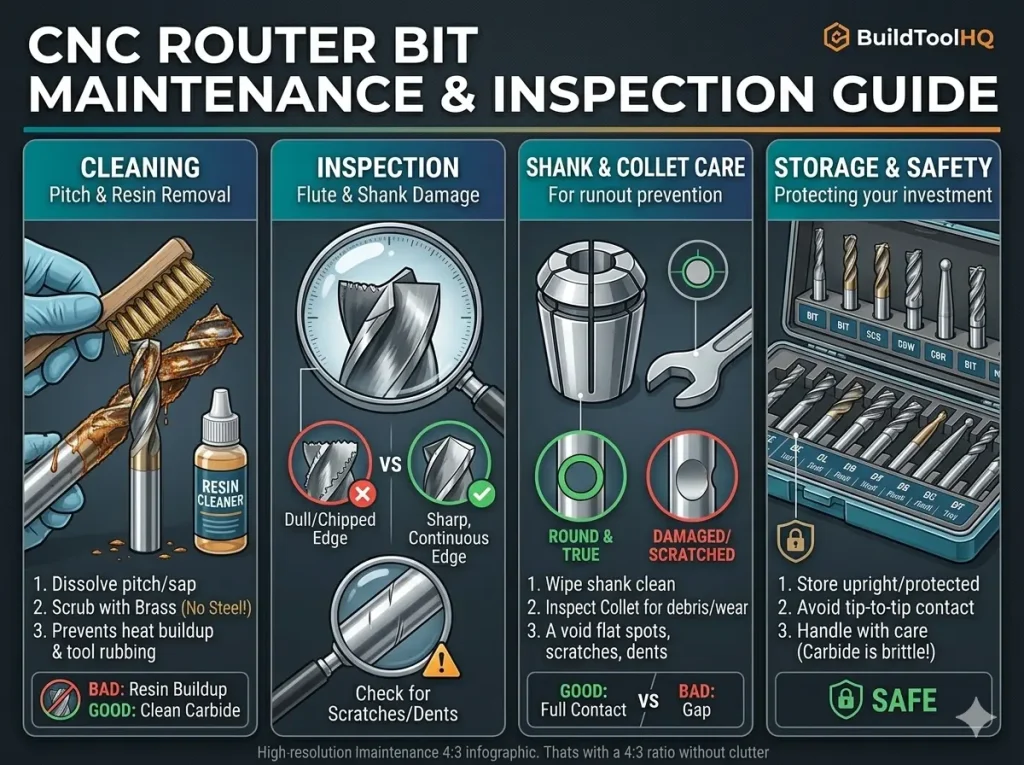
    To keep your CNC bit maintenance schedule efficient, you need a dedicated cleaning station. Don’t wait for the bit to turn black; clean it as soon as you see a “dull” film forming on the flutes.

    • The Solvent Bath: Submerge the cutting flutes in a non-corrosive solvent. For stubborn melted plastics from [O-Flute Bits for Plastics and Acrylics: Managing heat and preventing melting] runs, use a specialized resin remover.
    • The Dwell Time: Let the bits sit for 10–15 minutes. This allows the chemicals to penetrate the bond between the resin and the carbide.
    • The Brass Brush: Use a brass-bristled brush. Brass is softer than carbide and will not damage the cutting edge, but it is stiff enough to whisk away softened pitch.
    • Immediate Drying: After rinsing, dry the bit with a microfiber cloth and apply a moisture-displacing spray to prevent microscopic oxidation on the edge.

    3. The Sharpening Decision: To Hone or to Replace?

    A major question in CNC bit maintenance is when to send a tool for professional sharpening.

    4. Proper Storage: The “No-Touch” Rule

    Carbide’s greatest strength (hardness) is its greatest weakness (brittleness). If you keep your bits in a loose drawer where they can clink together, the edges are effectively “hammering” each other, leading to micro-fractures. Effective CNC bit maintenance requires a vertical storage block where no two cutting edges can touch.

    Climate-Controlled Tooling

    If your CNC is in a garage, humidity is your enemy. Store your primary bit collection in a weather-sealed “dry box” with silica gel packs. This prevents the “pitting” of the carbide surface that occurs in high-moisture environments, a step often overlooked in standard CNC bit maintenance routines.


    5. Collet Maintenance: The “Silent Killer” of Bits
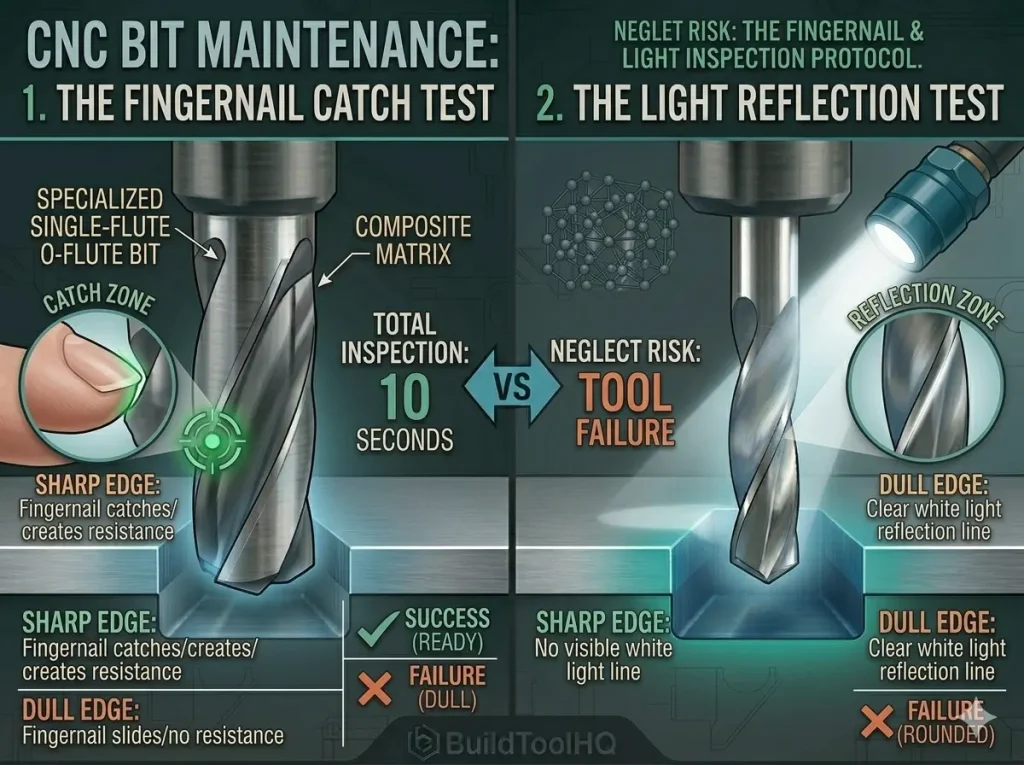
    Technical infographic diagram visualizing the two critical 10-second inspection protocols: The Fingernail Catch Test (left, sharp catch) and The Light Reflection Test (right, sharp dark line vs dull white line), using the specific single-flute O-flute bit detailed in BuildToolHQ guide
    Understanding sharpness: This diagram visualizes the critical 10-second inspection protocol. By mastering (left) the Fingernail Catch Test (where a sharp edge must catch the nail) and (right) the Light Reflection Test (where a sharp edge shows a dark line with no reflection, as seen in image_115.png), you prevent cutting with dull bits, which kill professional results and destroy the expensive tools

    You can have a perfectly clean bit, but if your collet is dirty, you will experience runout (the bit spinning off-center). Even 0.001″ of runout can reduce tool life by 50% by putting uneven pressure on the flutes.

    As part of your CNC bit maintenance routine, blow out the collet and the spindle taper with compressed air every time you change a bit. Replace your primary collets every 400–600 hours of run time to ensure a perfect “grip” on your precision [Ball Nose vs. Tapered Ball Nose: The nuances of 3D carving and finishing passes].


    6. Pre-Flight Visual Inspection (The 10-Second Test)

    Before hitting “Cycle Start,” perform these three CNC bit maintenance checks:

    1. The Fingernail Test: Gently drag your nail across the edge (away from the point). If it slides without “biting,” the tool is dull.
    2. The Color Check: Look for “bluing.” If the carbide has a blue or purple tint, the bit has exceeded its thermal limits and is now “softened.”
    3. The Shank Check: Look for circular scratches, which mean your bit was spinning inside the collet, leading to massive heat buildup.

    7.Strategic Maintenance for Heavy Clearance Tools

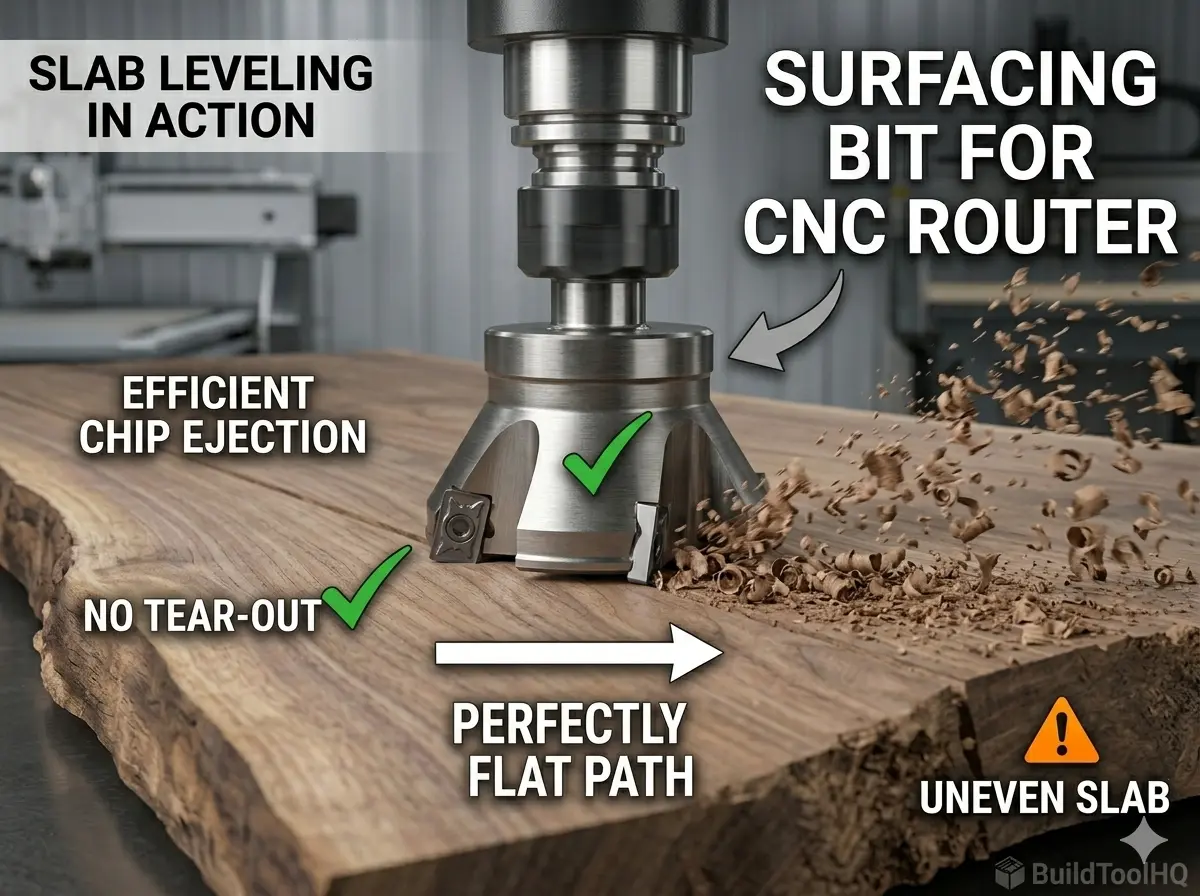
    Many users forget that CNC bit maintenance applies most critically to their largest tools. After leveling a massive slab, your [Surfacing bit for CNC router] will have accumulated significant resin due to the sheer volume of material removed.

    Cleaning the removable carbide inserts on these bits is far more cost-effective than allowing them to dull prematurely. By integrating this into your CNC bit maintenance workflow, you ensure your leveling passes remain glass-smooth without the “burn lines” associated with dirty cutters.

    Conclusion: Turning Maintenance into Profit

    Consider investing in tools that aid in your CNC Bit Maintenance process for improved efficiency.

    A disciplined CNC bit maintenance routine can double or triple the lifespan of your tooling. By treating your bits as precision scientific instruments rather than consumables, you ensure that every cut is as clean as the first and that your machine remains a profitable, high-precision asset.

    Frequently Asked Questions

    Effective CNC Bit Maintenance includes regular inspections to catch potential issues early.

    How often should I clean my CNC bits?

    You should clean your CNC bits as soon as you notice a visible “film” or dark residue on the flutes. For materials like pine or plywood, this may be after every 2–4 hours of run time. For plastics or aluminum, clean them immediately if you notice any “gumming” to prevent permanent heat damage.

    Can I use WD-40 to clean my CNC router bits?

    WD-40 is excellent as a post-cleaning moisture displacer, but it is not a dedicated resin solvent. For CNC bit maintenance, use a specialized pitch and resin remover or a concentrated degreaser like Simple Green to break down the organic bonds of wood resin without damaging the carbide.

    How do I know if my CNC bit is too dull to use?

    Perform the “Fingernail Test”: gently drag your nail across the cutting edge. If it slides smoothly without catching, the bit is dull. Other signs include “bluing” of the carbide (indicating over-heating), increased spindle noise, or fuzzy/burned edges on your workpiece.

    Is it worth it to sharpen small 1/4″ carbide CNC bits?

    Generally, no. The cost of professional sharpening for a 1/8″ or 1/4″ bit often equals or exceeds the cost of a new high-quality tool. Sharpening is best reserved for large-diameter surfacing bits or custom profiles where the replacement cost is over $50–$100.

    Can diamond coated CNC bits be sharpened at home?

    No. (Diamond coated CNC bits) require specialized Electrical Discharge Machining (EDM) to sharpen because diamond is harder than any standard grinding wheel. Attempting to sharpen these at home will destroy the microscopic diamond lattice and ruin the tool.
  • Diamond Coated CNC Bits: Mastering Composites and Abrasive Materials

    Diamond Coated CNC Bits: Mastering Composites and Abrasive Materials

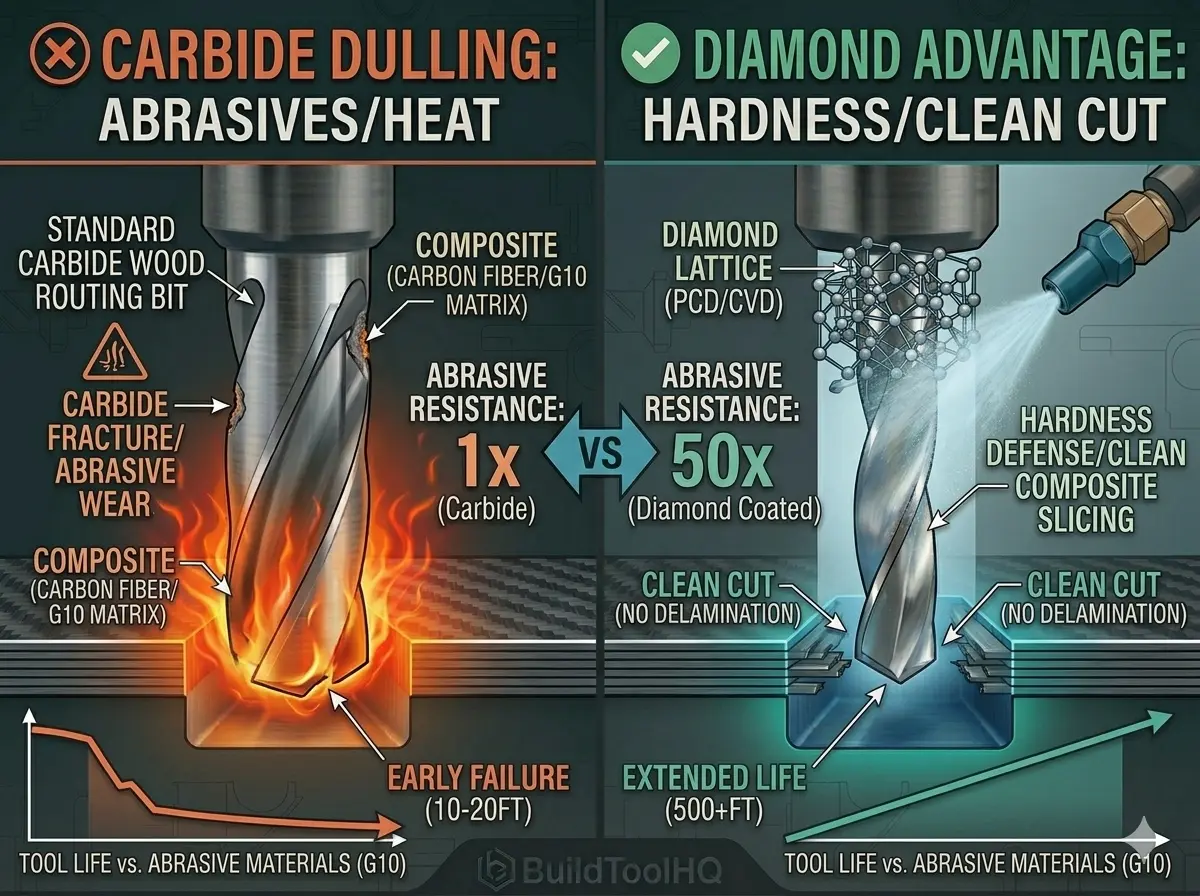
    For most CNC enthusiasts, solid carbide is the gold standard. However, as you move into professional-grade fabrication involving carbon fiber, G10, high-pressure laminates (HPL), or abrasive fiberglass, even the highest quality carbide will dull in minutes. This is where diamond coated CNC bits—specifically Polycrystalline Diamond (PCD) and Amorphous Diamond (CVD) coatings—become essential.

    Mastering these specialized tools is the difference between a clean, professional finish and a ruined, frayed workpiece. To see where these high-end tools sit in the hierarchy of your workshop, refer to our [The Ultimate Guide to CNC Router Bits: Selection, Speeds, and Materials].


    1. The Science of Abrasive Wear

    Standard materials like wood or soft plastics “cut” cleanly. However, composite materials are essentially a matrix of glue and microscopic “rocks” (glass or carbon fibers). When you use a standard [Upcut vs. Downcut vs. Compression Bits: When to use each for edge finish] on carbon fiber, those fibers act like sandpaper, grinding away the sharp edge of the carbide.

    Why Choose Diamond Coated CNC Bits?

    Diamond coated CNC bits utilize a layer of real or synthetic diamond bonded to the carbide shank. Because diamond is the hardest known material, it resists this abrasive grinding action. While a carbide bit might last for 10 feet of cutting in G10, a PCD diamond bit can often go for 500 feet or more, making diamond coated CNC bits the most cost-effective choice for industrial runs.


    2. PCD vs. CVD: Choosing Your Diamond

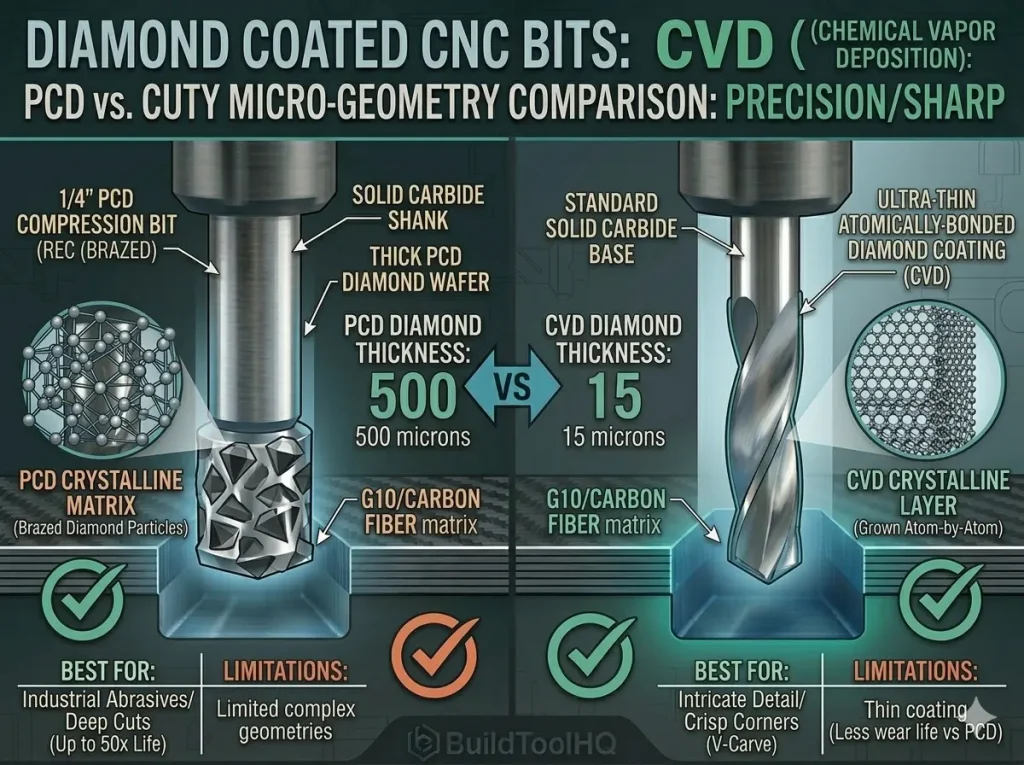
    Comparison diagram (4:3) visualizing the micro-geometry differences of diamond coated CNC bits, contrasting the heterogeneous structure of brazed PCD wafers with the perfectly layered atomic structure of a grown CVD diamond coating.
    Understanding diamond structures: This technical diagram visualizes the critical difference between PCD and CVD coatings. PCD (left) is a thick diamond wafer brazed for brute strength in heavy industrial abrasives. CVD (right) is a thin, uniform crystalline layer grown atomically onto the precise bit geometry, allowing for precision sharpness and intricate detail when using diamond coated CNC bits in HPL or phenolic resins.

    Not all diamond coated CNC bits are created equal. Depending on your project, you will choose between two primary types of diamond technology.

    • PCD (Polycrystalline Diamond): These bits have a thick wafer of diamond brazed onto the tool. They are the “tank” of the CNC world—incredibly durable but often limited in complex geometries.
    • CVD / Amorphous Diamond: This is a thin, microscopic coating applied to a carbide bit. It allows for the complex “O-flute” shapes we discussed in our guide for [O-Flute Bits for Plastics and Acrylics: Managing heat and preventing melting] while providing a surface hardness nearly equal to a natural diamond.

    3. Tool Geometry for Composites (Compression is King)

    Comparison diagram visualizing a standard standard upcut bit (left, orange) vs. a PCD diamond compression bit (right, teal) cutting a G10 composite, physically proving how the compression zone prevents top and bottom delamination fraying.
    Why compression is king: This technical diagram visualizes the victory. A standard 2-flute bit (left) quickly creates delamination fraying in G10. The diamond coated compression bit (right) uses top-down and bottom-up flutes to create "THE COMPRESSION ZONE." The exploded view (right) shows how this sandwiches the G10 core matrix together with support, allowing the PCD edge to slice the supported fibers cleanly, guaranteeing a zero-fray finish in abrasive materials with diamond coated CNC bits.

    When machining abrasive composites like carbon fiber or fiberglass, the “fraying” of the top and bottom layers is your biggest hurdle. This is why many diamond coated CNC bits use a compression geometry.

    Preventing Delamination

    A compression bit combines upcut and downcut flutes, sandwiching the material toward the center. This is the same logic used for high-end [Best CNC Bits for Plywood and Hardwoods: A deep dive into wood-specific geometry] to prevent splintering, but with the added hardness required to slice through glass fibers.

    If you are working on 3D contoured composite parts, such as an aerodynamic wing, you may need to transition to a diamond-coated version of the tools found in our [Ball Nose vs. Tapered Ball Nose: The nuances of 3D carving and finishing passes] guide.


    4. Speeds, Feeds, and the “Dust” Factor

    Unlike [Aluminum Cutting with CNC: Single-flute secrets and lubrication], where we focus on large chips, abrasive composites produce a very fine, hazardous dust.

    • RPM and Feed Rate: Diamond coated CNC bits can handle higher RPMs, but you must keep your feed rate fast. If you dwell too long, friction will heat the resin, causing it to “gum up” the diamond coated CNC bits.
    • Dust Collection: Carbon fiber dust is electrically conductive and fiberglass is a respiratory irritant. High-velocity vacuum boots are mandatory.

    5. Specialized Bits for Signage and Inlays

    Often, you may find yourself using abrasive “faux-stone” or phenolic resins for high-end signage. These materials are incredibly hard on standard bits.

    If your design requires intricate lettering, you cannot rely on standard carbide. You must use specialized diamond coated CNC bits designed for sign making, specifically diamond-tipped [V-Carve Bits and Sign Making: Achieving crisp detail and sharp corners]. This ensures the “point” of the bit stays sharp, maintaining the crisp corners required for professional work.


    6. Cost vs. Longevity: Is the Investment Worth It?

    The sticker shock of diamond coated CNC bits is real—they can cost 5x to 10x more than carbide. However, the ROI is calculated in “uptime”.

    1. Reduced Tool Changes: You don’t have to swap a dull bit every 20 minutes.
    2. Finish Quality: A sharp diamond edge prevents “hairy” edges that require hours of sanding.
    3. Accuracy: Unlike dulling carbide, diamond coated CNC bits stay sharp, ensuring your slots stay exactly to the millimeter. This precision is just as vital as having a level bed, which you can achieve using a [Surfacing bit for CNC router].

    7. Maintenance of High-End Diamond Tooling

    Carving through dense composites means your diamond coated CNC bits will face extreme resin buildup.


    Conclusion: The Ultimate Tool for the Ultimate Material

    Diamond coated CNC bits represent the pinnacle of routing technology. By investing in these tools, you move beyond the limitations of wood and soft metals and enter the world of aerospace-grade composites and industrial-strength laminates.

    Frequently Asked Questions (FAQ)

    Can I use diamond coated CNC bits on aluminum?

    Actually, no. Diamond has a chemical affinity for carbon, and at high temperatures, the diamond can actually dissolve into the metal. For metal, stick to our [Aluminum Cutting with CNC: Single-flute secrets and lubrication] guide.

    How do I know if my bit is PCD or CVD?

    PCD bits usually have a visible “chip” of black diamond material at the cutting edge. CVD bits look like standard bits but have a rainbow-like or matte black sheen.

    Can I sharpen diamond coated CNC bits?

    PCD bits must be sent to a professional service that uses electrical discharge machining (EDM). Standard grinders cannot touch diamond.

  • Aluminum Cutting with CNC: Single-Flute Secrets and Lubrication

    Aluminum Cutting with CNC: Single-Flute Secrets and Lubrication

    Machining aluminum on a gantry-style CNC router is often seen as the “final boss” for makers. Unlike wood, aluminum has a narrow window for success. If your speeds are wrong, you’ll hear a deafening scream; if your lubrication fails, the aluminum will weld itself to your tool flutes. However, by mastering aluminum cutting with CNC, you open the door to professional-grade brackets, faceplates, and mechanical parts.

    The secret isn’t a bigger motor—it’s the math of chip evacuation, rigidity, and strategic heat management. This level of precision is a core component of your overarching shop strategy, which we detail extensively in [The Ultimate Guide to CNC Router Bits: Selection, Speeds, and Materials].


    1. Why Single-Flute Bits are Non-Negotiable

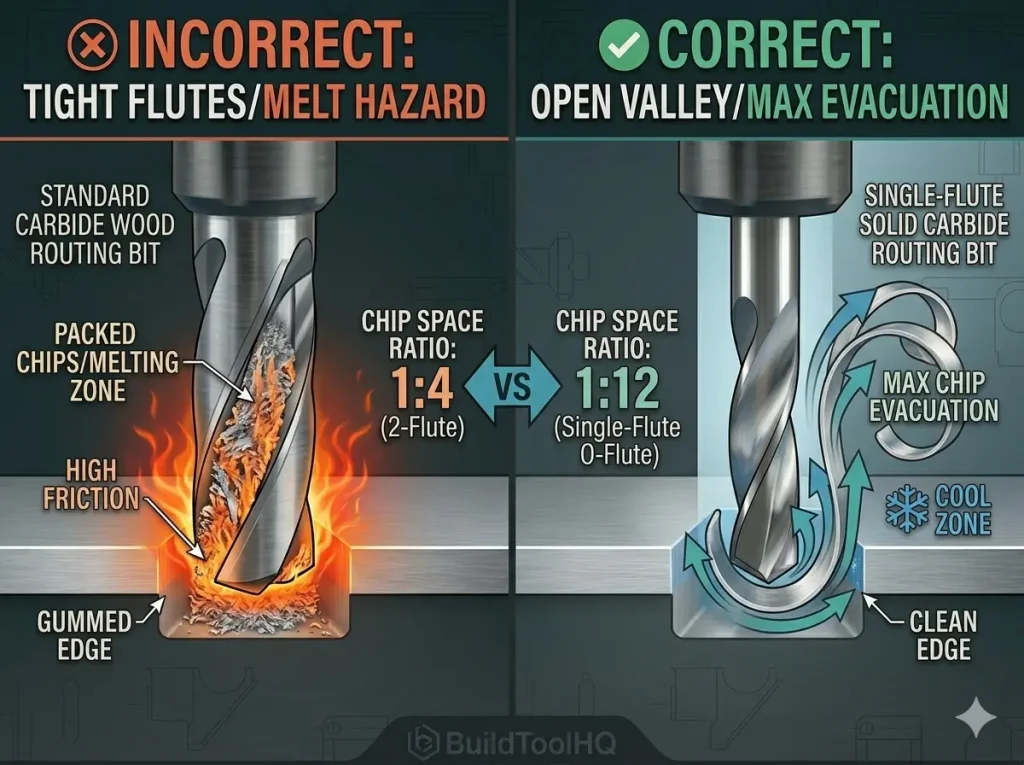
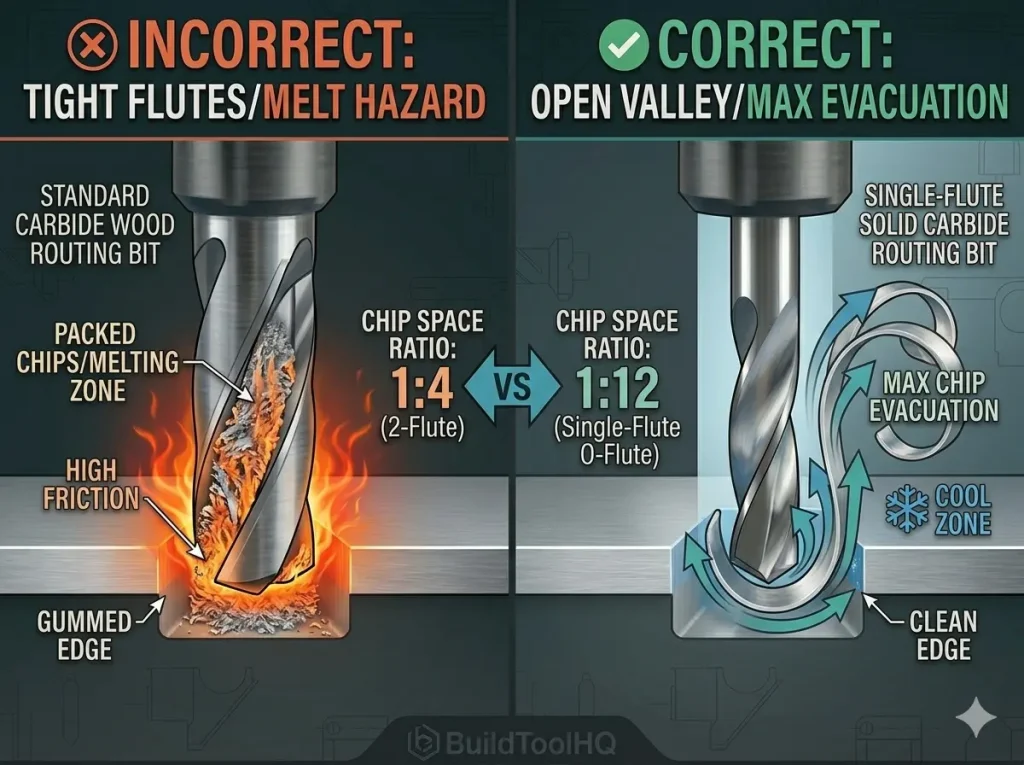
    Comparison diagram showing why single-flute O-flute bits are necessary for aluminum cutting with CNC, contrasting massive chip evacuation space vs. a standard 2-flute bit clogging and melting.
    Understanding the single-flute advantage: This technical cross-section proves why standard 2-flute bits (left) fail in metal. Their tight flutes pack and melt aluminum dust. The O-flute (right) has a massive, open valley designed specifically to eject continuous, curled chips, preventing heat buildup in aluminum cutting with CNC.

    When aluminum cutting with CNC, your biggest enemy is heat. Standard woodworking bits with 2 or 3 flutes, such as those discussed in our [Upcut vs. Downcut vs. Compression Bits: When to use each for edge finish] guide, are often disastrous in aluminum because they don’t provide enough space for the metal chips to escape.

    The Single-Flute Advantage

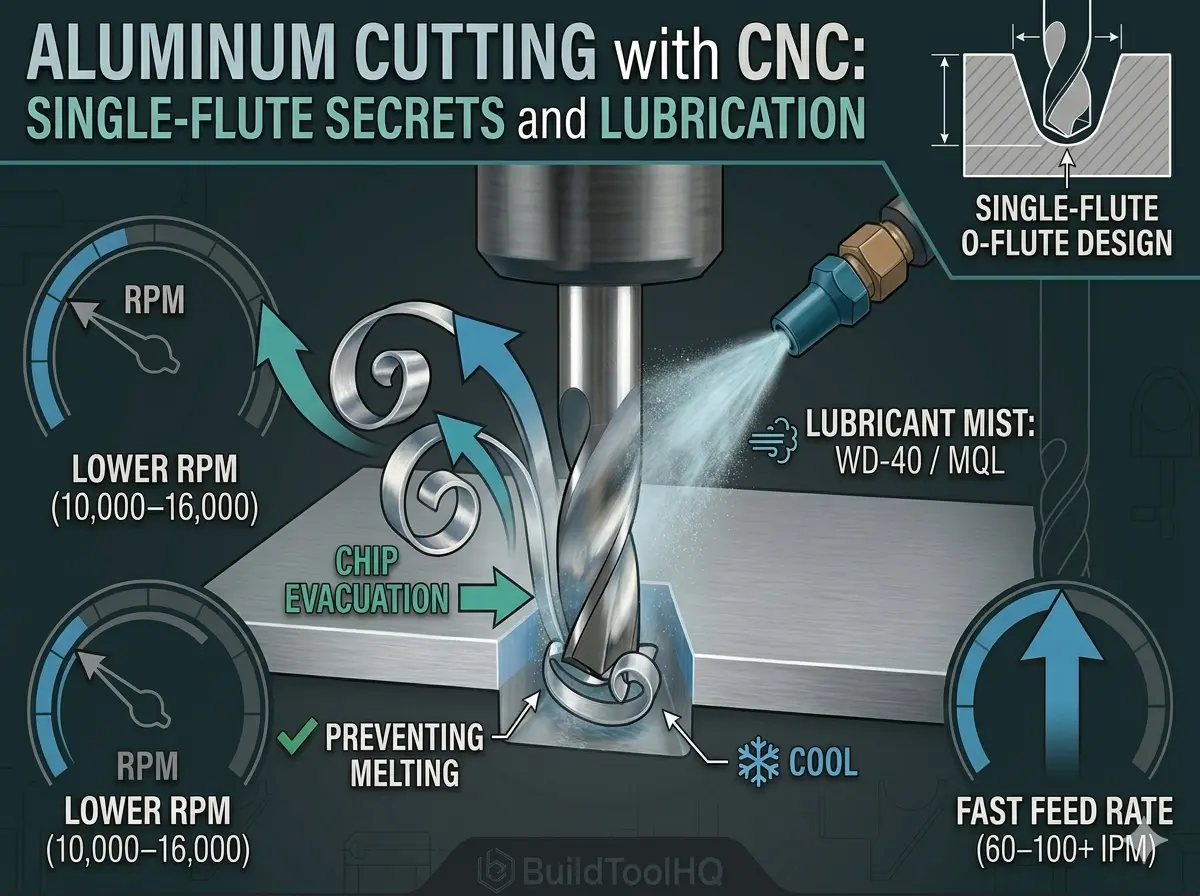
    In aluminum, you need a single-flute “O-flute” bit. Because there is only one cutting edge, the “valley” (the flute) is massive. This allows large, hot aluminum chips to be flung away before they can weld to the carbide. Using a single-flute bit also allows you to maintain a high feed rate while keeping your RPM lower, which is the foundational secret to keeping the tool cool.


    2. Speeds and Feeds: The “Sweet Spot” Formula

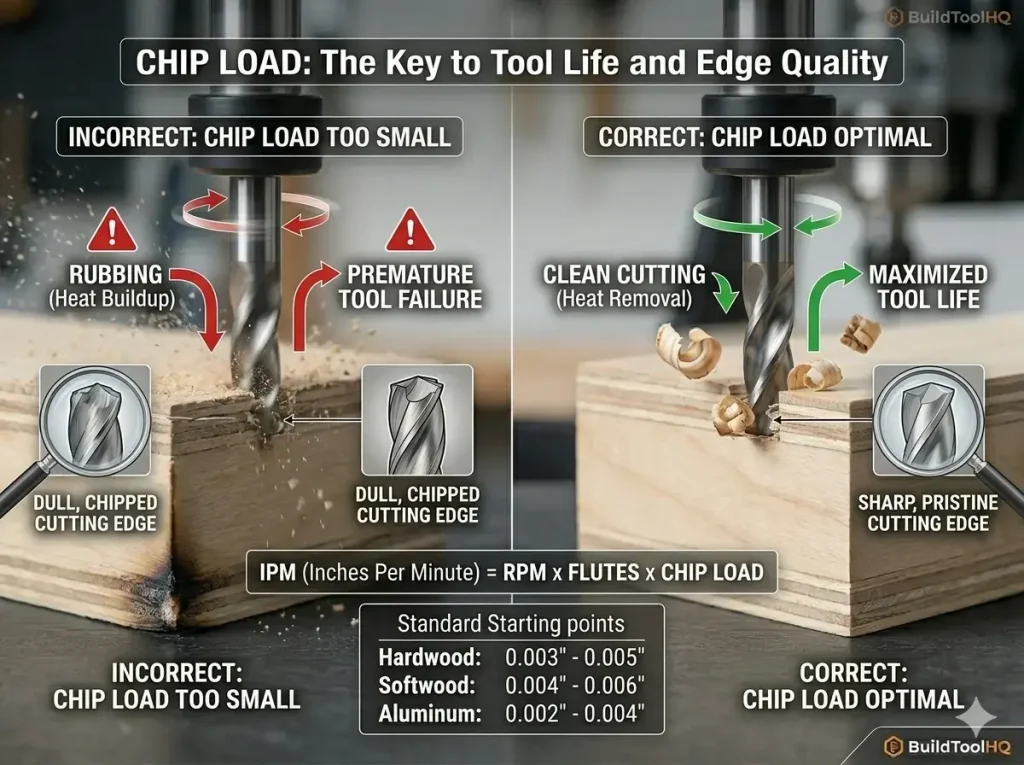
    Most beginners make the mistake of running the spindle too fast and the movement too slow. This causes the bit to “rub” rather than “cut,” creating friction that melts the aluminum.

    Understanding Chip Load in Metal

    • The Goal: You want to produce “6-shaped” chips, not silver dust. Dust indicates you are grinding the metal, which generates heat.
    • The Strategy: Lower your RPM (typically 10,000–16,000) and increase your feed rate (60–100+ IPM depending on machine rigidity).

    If you are transitioning from cutting Plexiglass, you’ll find the logic is identical to our [O-Flute Bits for Plastics and Acrylics: Managing heat and preventing melting] guide: chip load is everything. If the bit takes a big enough “bite,” the heat leaves the part inside the chip rather than staying in the tool.

    3. The Necessity of Lubrication and “Mister” Systems

    Comparison diagram visualizing the thermal difference between dry cutting aluminum (melt hazard, red) and mist lubrication (cool cut, teal) when performing aluminum cutting with CNC.
    Understanding lubrication: This thermal heat map visualizes the critical difference a mister system makes. Dry cutting (left) quickly generates intense heat, leading to friction and aluminum welding. Using MQL (mist lubrication, right) during aluminum cutting with CNC creates a cool environment and ensures heat leaves the part inside the pristine, curled chip.

    You can cut wood dry, but aluminum cutting with CNC almost always requires a lubricant or a “coolant”. Without it, the aluminum becomes “sticky” as it heats up, leading to built-up edge (BUE).

    WD-40 vs. Mist Systems

    For short runs, a manual spray of WD-40 can work, but for professional results, a Minimum Quantity Lubrication (MQL) system is best. These systems use compressed air to atomize lubricant directly onto the bit.

    • Air-Cooling: The constant blast clears chips so the bit doesn’t “recut” them.
    • Lubrication: The oil prevents the aluminum from sticking to the carbide flutes.

    If you are building signs that combine metal and wood, ensure your lubrication doesn’t soak into the wooden elements, particularly when using [Best CNC Bits for Plywood and Hardwoods: A deep dive into wood-specific geometry] or detailed [V-Carve Bits and Sign Making: Achieving crisp detail and sharp corners].


    4. Rigidity and Workholding Strategies

    Aluminum exerts much higher lateral forces on your machine than wood does. If your part moves even a fraction of a millimeter, the bit will chatter and likely break.

    • Advanced Workholding: Blue Tape and Super Glue are excellent for thin aluminum sheets where traditional clamps might bow the material.
    • Depth of Cut (DOC): Be conservative. It is better to take multiple shallow passes (0.2mm – 0.5mm) at high speed than one deep pass.

    For those doing intricate 3D carvings in soft metals, the same principles of rigidity apply as they do in our [Ball Nose vs. Tapered Ball Nose: The nuances of 3D carving and finishing passes] guide—stability is the parent of precision.


    5. Integrating Metal into Your Tooling Ecosystem

    Successfully aluminum cutting with CNC requires a level of machine maintenance often overlooked in woodworking. Ensure your spindle is trammed and your wasteboard is perfectly flat. You must refer to our guide on the [Surfacing bit for CNC router] to level your spoilboard before attempting metalwork.

    Additionally, metal chips are abrasive. Even with a mister, you must protect your investment. Review our [CNC Bit Maintenance: Sharpening, cleaning, and storage for longevity] protocols to ensure your O-flutes remain sharp for the next job. For ultra-hard alloys or high-production runs, you might eventually require the durability of [Diamond Coated & Specialized Bits: For composites and abrasive materials].

    6.Troubleshooting common CNC Aluminum Issues

    • The Screaming Sound: This means your RPM is too high for your feed rate. The bit is “rubbing.” Increase your feed rate or lower your RPM immediately.
    • The “Gummy” Build-up: If you see silver blobs stuck to your bit, your lubrication is insufficient. Stop the cut before the bit snaps.
    • Rough Edge Finish: Often caused by “chatter.” Check your workholding and decrease your Depth of Cut.

    7.Professional Finishing Pass Strategy

    To achieve a “mirror” finish on your metal projects, don’t try to complete the aluminum cutting with CNC in a single pass. Instead, use a tiered approach to manage the heat and tool deflection that often occurs during aluminum cutting with CNC.

    • Roughing Pass: During the bulk of your aluminum cutting with CNC, leave approximately $0.2mm$ of material on the walls. This ensures that any “chatter” or vibration from the high-load stage doesn’t ruin the final dimensions of the part.
    • Finishing Pass: For the final stage of aluminum cutting with CNC, run the single-flute bit at the full depth of the part but with a very small step-over. Switching to conventional milling for this final shave allows the bit to move against the rotation, yielding a cleaner surface.

    This two-step method is the BuildToolHQ secret to successful aluminum cutting with CNC, resulting in parts that look like they were manufactured on an industrial mill rather than a hobbyist router.


    Conclusion: Mastering the Metal

    Mastering aluminum cutting with CNC is a major milestone for any maker. It moves you beyond simple woodworking, transforming you from a hobbyist into a capable machinist. By selecting a high-quality single-flute bit, dialing in your feed rates to produce actual chips, and using consistent lubrication, you can produce professional-grade results. Ultimately, successful aluminum cutting with CNC allows you to produce parts that look like they came out of an industrial machine shop. As you refine your strategy for aluminum cutting with CNC, you’ll find that precision and heat management are the keys to unlocking the full potential of your gantry-style router.

    Frequently Asked Questions (FAQ)

    What is the best aluminum alloy for CNC?

    6061-T6 is the industry standard for its balance of strength and machinability. However, 7075 is actually easier to machine (it’s less “gummy”), though it is significantly more expensive.

    Can I use a shop vac for chip clearance?

    Yes, but be careful. Aluminum chips are sharp and heavy. A dedicated air blast (mister) is far more effective for clearing the cut path than a vacuum alone.

    How do I clean an aluminum-welded bit?

    If aluminum has melted onto your carbide bit, you can often dissolve the aluminum by soaking the bit in a lye solution (sodium hydroxide). The lye will eat the aluminum but leave the tungsten carbide unharmed.

    Can I use these bits for surfacing?

    No, O-flutes are for profile cutting. For large-area leveling, you need a dedicated [Surfacing and Slab Leveling Bits: Mastering large-area clearing].

  • The Best CNC Bit for Cutting Acrylic: O-Flute Geometry to Prevent Melting

    The Best CNC Bit for Cutting Acrylic: O-Flute Geometry to Prevent Melting

    Machining plastics like acrylic, HDPE, or PVC is a paradox. These materials often cut beautifully, yielding an optically clear edge directly off the machine—until they don’t. The moment friction generates excessive heat, the plastic transitions from a crisp solid to a viscous molten state. This molten plastic instantaneously “welds” itself into the flute valley of your expensive carbide tool, effectively destroying the cutting geometry and usually snapping the bit.

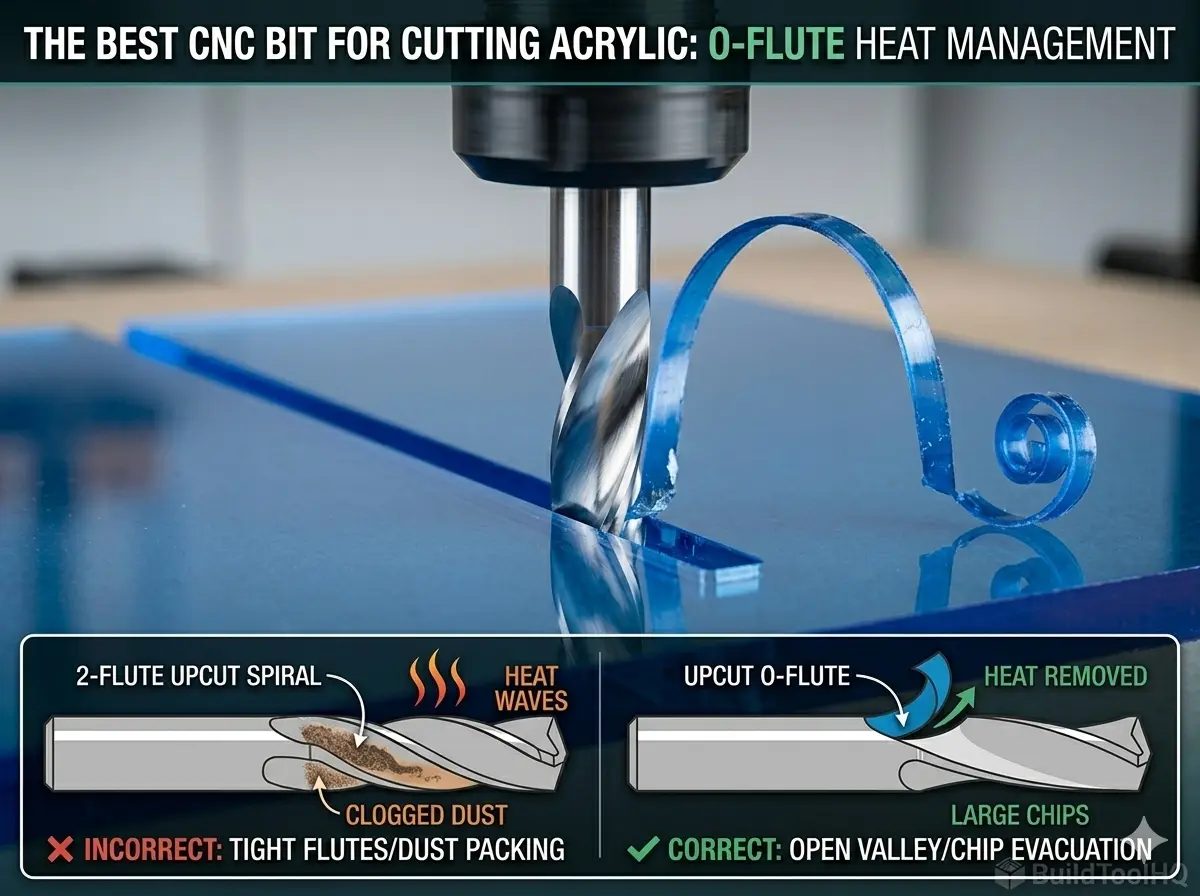
    The entire challenge of cutting plastics on a CNC router is heat management. While correct speeds and feeds are vital, the foundational solution starts with selecting the right tool geometry. If you are struggling with melted Plexiglass or gummed-up HDPE, you need to switch from standard wood bits to a dedicated O-flute bit, arguably the best CNC bit for cutting acrylic.

    Choosing the best CNC bit for cutting acrylic can significantly impact your project outcomes, especially when dealing with the heat generated during the cutting process. It is a core component of your overarching shop strategy, which we detail extensively in [The Ultimate Guide to CNC Router Bits: Selection, Speeds, and Materials].


    1. The Plastic Paradox: Why Standard Bits Fail

    A standard router bit, such as those discussed in our [Upcut vs. Downcut vs. Compression Bits: When to use each for edge finish] guide, typically features two, three, or even four flutes. These multiple flutes work beautifully in wood because they produce small, fine dust particles. The goal in woodworking is dust evacuation.

    The Melting Point Trap

    Plastics behave differently. The friction created by multiple flutes dwelling in the cut generates rapid heat buildup. Unlike wood, which dissipates some heat, plastic traps it. The dust produced by multiple flutes cannot carry the heat away fast enough. It becomes trapped in the tight flute valleys, melts instantly, and welds to the carbide, causing catastrophic tool failure.

    Choosing the right tool is crucial; the best CNC bit for cutting acrylic offers superior heat management compared to standard bits. This is where the O-flute geometry (often a single-flute design) shines.


    2. Anatomy of the O-Flute (Where Geometry Meets Physics)

    The “O” in O-flute refers to the shape of the flute valley itself. If you look at the cross-section of a high-quality single-flute plastic bit, you will see a massive, open, crescent-shaped curve (an “O” or “U” shape). This is an engineering solution for chip load. Considering the best CNC bit for cutting acrylic is essential for anyone looking to enhance their CNC machining capabilities.

    Chip Load is Heat Management

    When cutting acrylic, you do not want to produce dust; you want to produce chips. Specifically, you want to produce continuous, curled “shavings” or “strings” of plastic. These large, continuous chips are the primary mechanism for carrying heat away from the cutting zone.

    O-flute geometry provides a massive, unobstructed path for these curled chips to eject instantly. By removing the massive chip immediately, the heat is carried out of the cut, leaving the workpiece cool. In contrast, standard multi-flute tools often recut their chips in plastic, which guarantees melting; O-flutes eject them perfectly.

    3. Upcut vs. Downcut O-Flutes (Managing the Surface Finish)

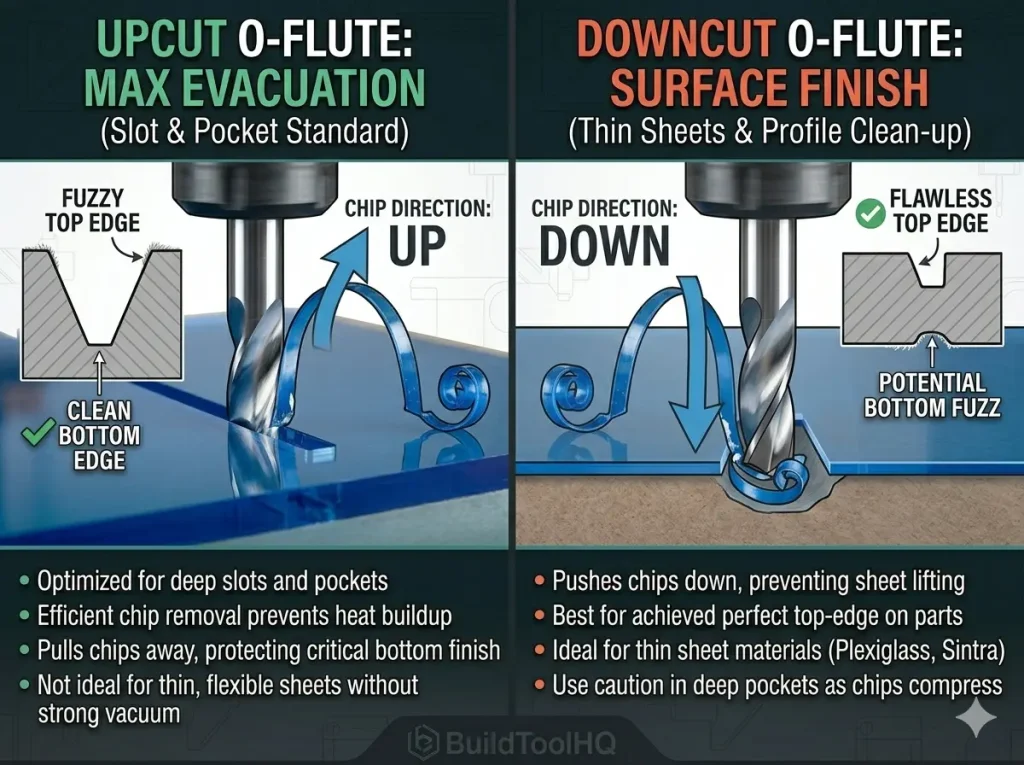
    Best CNC Bit for Cutting Acrylic Comparison diagram of Upcut O-flute and Downcut O-flute bit geometry showing how chip direction affects the surface finish of acrylic on a CNC router.
    Understanding Chip Direction: This comparison proves how Upcut O-flute geometry (left) pulls large chips UP and OUT for pockets, while Downcut geometry (right) compresses chips DOWN, achieving a perfect top edge on thin acrylic. A crucial step when choosing the best CNC bit for cutting acrylic.

    Like all spiral bits, O-flutes come in both upcut and downcut configurations, and your choice here determines your final part finish. Utilizing the best CNC bit for cutting acrylic not only improves the quality of the cut but also enhances the overall workflow of your CNC operations.

    Upcut O-Flutes (The Standard Choice)

    A single-flute upcut O-flute is the default best CNC bit for cutting acrylic. It pulls chips up and out of the cut with massive efficiency. Because this bit is designed to handle the unique challenges posed by plastic, it provides a much smoother cutting experience than a standard upcut spiral bit used for wood.

    • Best Use: Essential for slots, pockets, and deep cutouts where chip packing is a hazard.
    • Surface Outcome: Leaves a flawless finish on the bottom edge but can “lift” thin sheets.

    Downcut O-Flutes (Thin Sheet Specialist)

    A downcut O-flute pushes the chips downward into the spoilboard. This is often the best CNC bit for cutting acrylic when working with thin sheets (e.g., 1/8″ or less) because the downward force prevents the material from lifting.

    Best Use: Excellent for profile cuts where the top edge finish is critical. It is the preferred choice when your project requires the same clean entry edge found in high-end [Best CNC Bits for Plywood and Hardwoods: A deep dive into wood-specific geometry] applications.


    4. Pro-Tips for Managing Heat in Acrylic (BuildToolHQ Expert Advice)

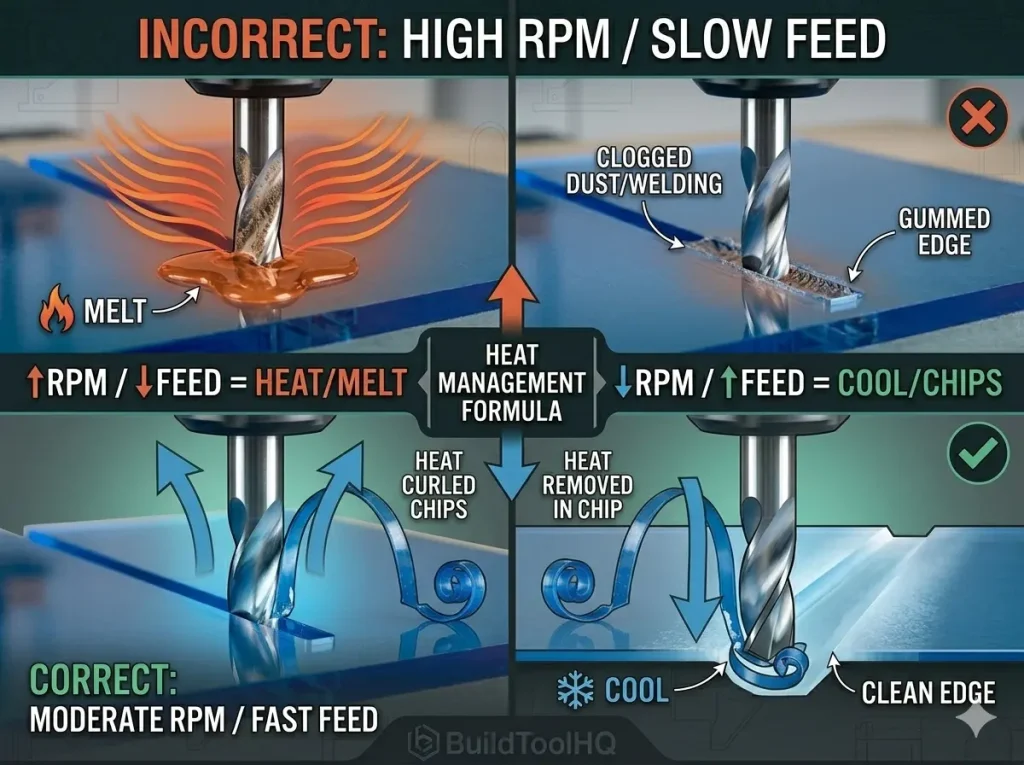
    Visualization diagram comparing correct and incorrect CNC speeds and feeds for acrylic, showing heat management with O-flute bits and how chip load prevents melting.
    Heat Management visualizing: This diagram proves how correct speeds and feeds prevent melting. The incorrect strategy (top) creates excessive friction, while the correct strategy (bottom) ensures that the massive chip load (the defining O-flute feature) carries the cutting heat away in the chip, not into the acrylic. A vital consideration when choosing the best CNC bit for cutting acrylic.

    For complex 3D projects that may inlay detailed plastic parts into wood, the strategy changes. We recommend reviewing our guide on [Ball Nose vs. Tapered Ball Nose: The nuances of 3D carving and finishing passes], which handle finishing detail and contours very differently than a dedicated plastic cutout bit.

    Furthermore, if the acrylic is being inset into a sign, ensure your pocketing matches the precision of your [V-Carve Bits and Sign Making: Achieving crisp detail and sharp corners] to ensure a seamless fit. To see how these specialized tools fit into a complete workshop inventory, check our [The Ultimate Guide to CNC Router Bits: Selection, Speeds, and Materials].

    5.Pro-Tips for Managing Heat (BuildToolHQ Expert Advice)

    Selecting the best CNC bit for cutting acrylic is only 50% of the puzzle. The remaining 50% is implementation and strategy.

    A. The Golden Rule: FAST Feed, SLOW RPM

    This is counter-intuitive to most new CNC users. High RPM with a slow feed rate generates friction and melting. Instead, follow this formula: Moderately Slow Spindle RPM (12,000–16,000 RPM) + VERY Fast Feed Rate (150–300+ IPM). You want that single-flute O-bit taking massive bites to keep it cool.

    B. “Ramp” Into the Cut (Never Plunge)

    Plunging straight down creates instant friction on the tip of the bit. Always set your CAM software to use a “ramp” entry toolpath, which moves the bit simultaneously in X, Y, and Z. This is as vital as the precision leveling techniques found in the [Surfacing bit for CNC router] guide.

    C. The Conventional Cleanup Pass

    To achieve an optically clear edge, run your part using a “Roughing” pass, leaving about $0.01″$ ($0.25mm$) of material. Then, perform a final light “Finish” pass using a Conventional milling direction (counter-clockwise). This removes the minor marks left by the roughing pass, leaving a flawless surface ready for flame polishing.

    6.Maintenance and Specialized Durability

    Carving plastics and acrylics for long durations can still lead to buildup. Ensure you are cleaning your bits according to our [CNC Bit Maintenance: Sharpening, cleaning, and storage for longevity] protocols. For projects involving abrasive composites or resin-heavy hybrids, you may need to step up to [Diamond Coated & Specialized Bits: For composites and abrasive materials] to maintain a sharp edge.

    Finally, never forget that a clean cut starts with a level bed. Run a surfacing pass with a [Surfacing and Slab Leveling Bits: Mastering large-area clearing] to ensure your depths are consistent across the entire acrylic sheet.


    Conclusion: Clean Cuts, Not Melted Messes

    Understanding the characteristics of the best CNC bit for cutting acrylic is vital for efficient machining.

    By consistently using the best CNC bit for cutting acrylic, your projects will maintain a high standard of quality.

    Don’t let melting plastic ruin your projects or destroy expensive tooling. By focusing on efficient chip evacuation using O-flute geometry, you can transform your plastic routing from a messy failure into a professional operation. By choosing the best CNC bit for cutting acrylic and implementing the right speeds and feeds strategy, BuildToolHQ ensures you achieve clean, polished results every time.

    The best CNC bit for cutting acrylic can help you achieve optimal results with less trial and error.


    Frequently Asked Questions (FAQ)

    What is the best CNC bit for cutting acrylic without melting?

    Without question, a solid carbide single-flute upcut O-flute bit is the best CNC bit for cutting acrylic. Its massive, open flute valley is designed specifically to evacuate large, curled chips that carry heat away from the workpiece.

    Can I use a regular wood upcut spiral bit on acrylic?

    While possible, it is highly inefficient and risks tool failure. A standard [Upcut vs. Downcut vs. Compression Bits: When to use each for edge finish] has multiple tight flutes that trap plastic dust, leading to instant “welding” and bit breakage.

    How do I get optically clear edges on acrylic?

    Use a sharp O-flute bit and run a two-pass strategy: a roughing pass followed by a $0.01″$ conventional milling finish pass. This is the BuildToolHQ secret to a professional, frosty edge.

    Is there a bit better suited for aluminum?

    While O-flutes can sometimes cut non-ferrous metals, you should refer to our dedicated guide on [Aluminum Cutting with CNC: Single-flute secrets and lubrication] for metal-specific geometry.

  • Best CNC V-Carve Bits for Signs: How to Get Crisp, Sharp Corners

    Best CNC V-Carve Bits for Signs: How to Get Crisp, Sharp Corners

    V-carving is the soul of classic sign making. When a CNC machine cuts a standard 2D profile, the result is often flat and mechanical. But when that same machine drives a pointed V-bit simultaneously in the X, Y, and Z axes, it produces deep, “chiseled” lines that capture light and create dramatic shadow. This 2.5D technique transforms simple text into professional, dimensional art.

    To achieve a sand-free, professional result, you must choose the best CNC v-carve bits for signs. This selection is a core component of your overarching strategy, as detailed in [The Ultimate Guide to CNC Router Bits: Selection, Speeds, and Materials]. Selecting the right tools, especially the best CNC v-carve bits for signs, can significantly affect the outcome of your project.


    1. What is V-Carving? (The Prismatic and Corner Lift Concepts)

    By leveraging the best CNC v-carve bits for signs, you will be able to create high-quality signage with ease.

    Choosing the right tools, such as the best CNC v-carve bits for signs, will enhance your overall sign-making experience.

    Learning about the best CNC v-carve bits for signs can help you understand how to get the best results from your CNC machine.

    Standard router bits (like upcut spirals) remove a predictable width of material based on their diameter. V-carve bits are different. They do not remove a set diameter; instead, they cut based on their point.

    Investing in the best CNC v-carve bits for signs will lead to better outcomes and greater satisfaction with your projects.

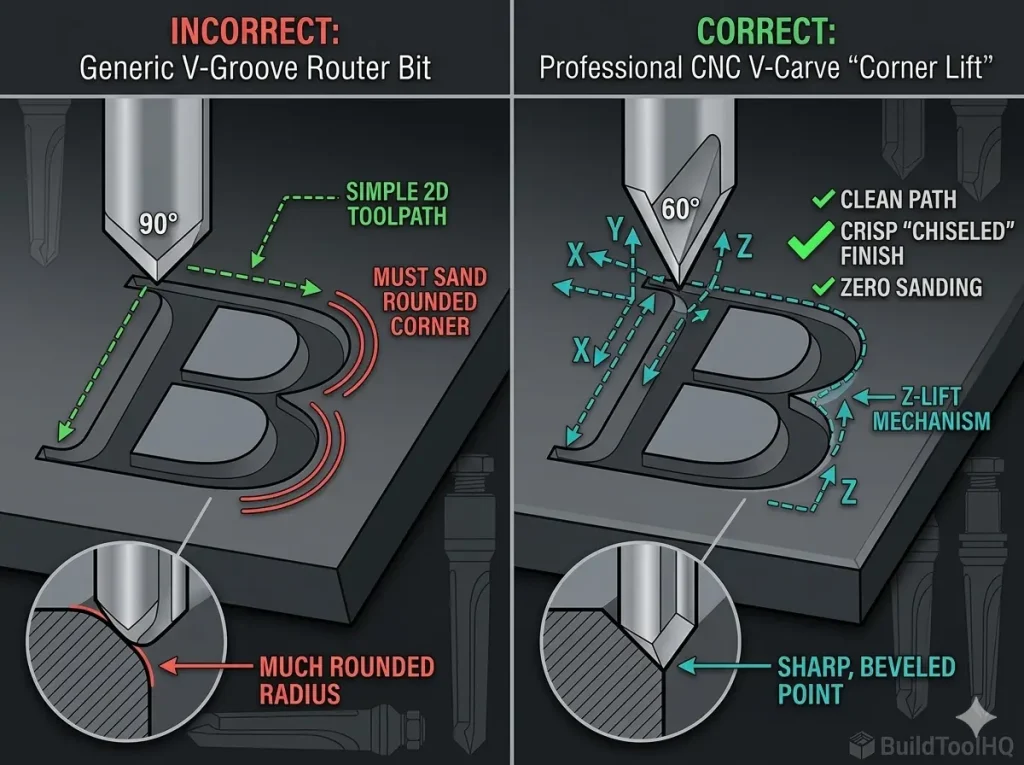
    In a V-carve toolpath, the CNC software calculates a fluctuating Z-depth to match the varying width between the letters on your design. Where a font stroke is thin, the bit runs shallow. Where the stroke is wide, the bit dives deep. This automatic Z-depth change means the V-groove router bit creates a perfect beveled edge along every curve of your sign, culminating in a crisp point.

    By focusing on the best CNC v-carve bits for signs, you can create intricate designs that capture attention and admiration.

    The Magic of “Corner Lifting”

    The main reason to choose the best CNC v-carve bits for signs is “corner lifting.” When a V-bit reaches the end of a stroke, the Z-axis physically lifts the point of the bit, creating a perfectly defined, sharp corner. A flat-bottom bit (like those discussed in [Ball Nose vs. Tapered Ball Nose: The nuances of 3D carving and finishing passes]) will always leave a radius in a corner; only a pointed V-bit can achieve that precise, “chiselled” finish that defines professional sign making.

    When you opt for the best CNC v-carve bits for signs, you ensure that your text stands out with clarity and depth, making your signs truly eye-catching.


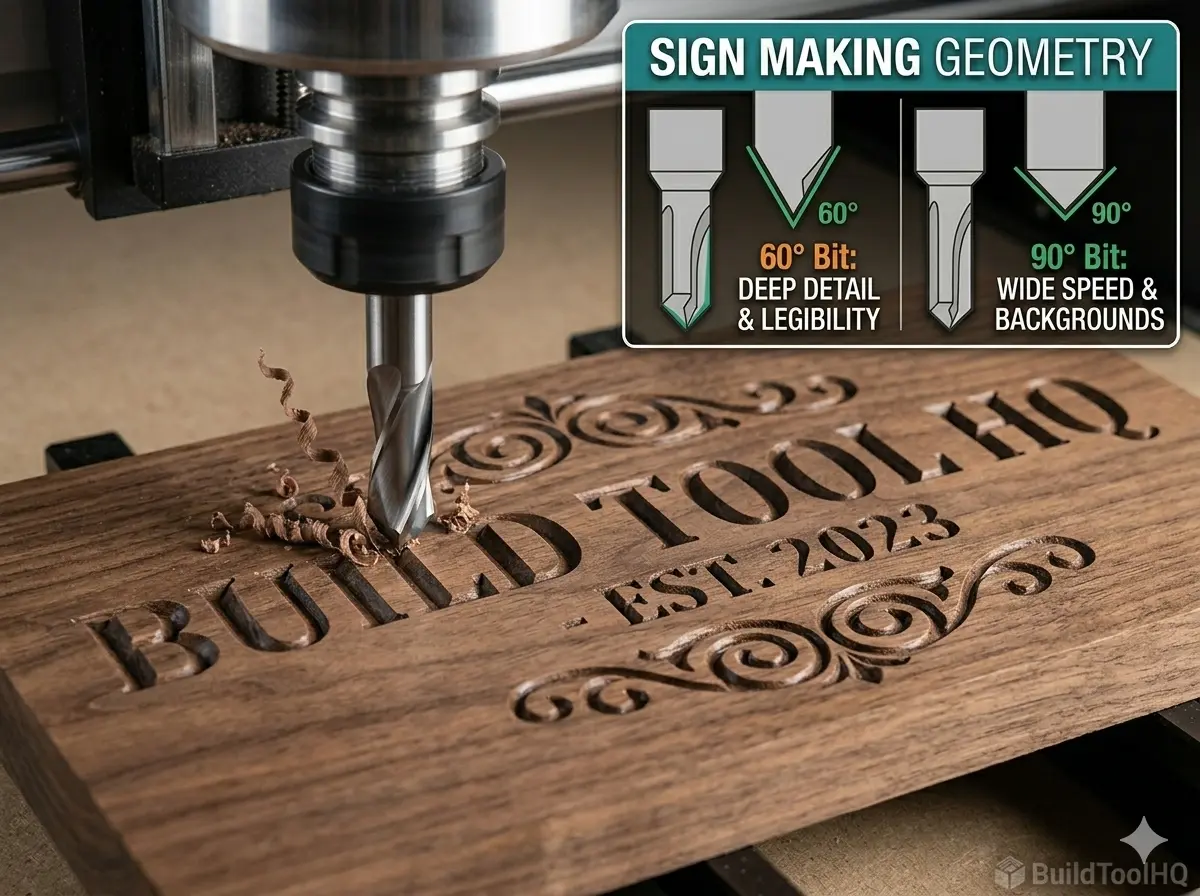
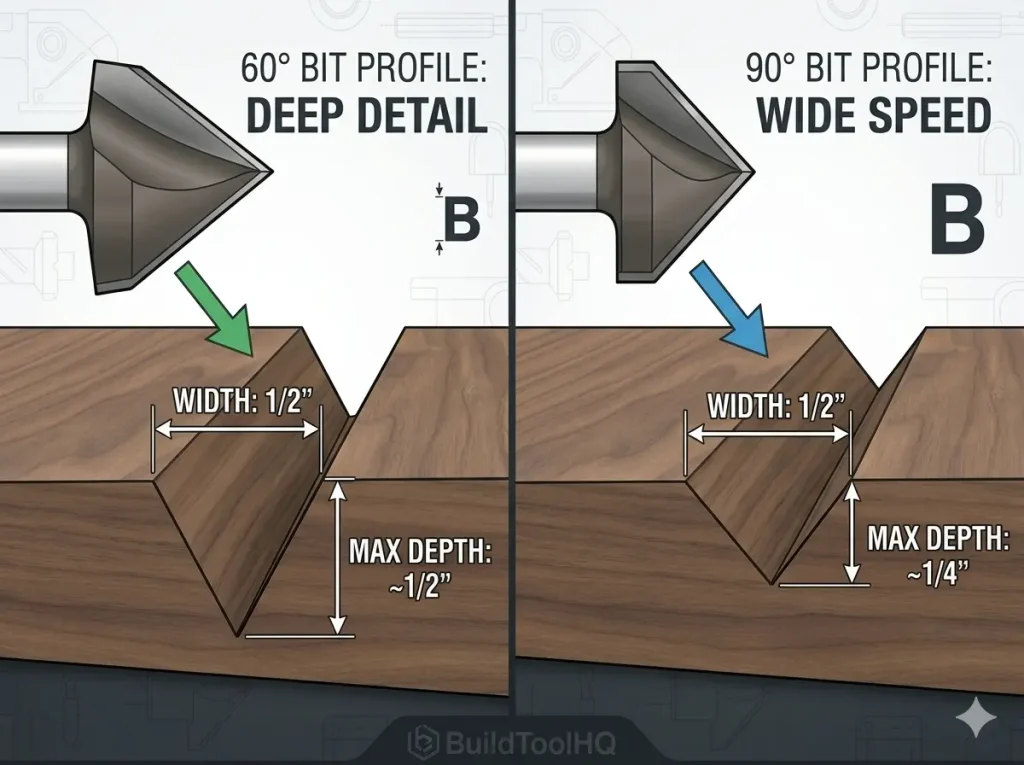
    2. The 60 vs 90 Degree V-Bit Debate (Choosing Your Weapon)

    Comparison diagram of 60 degree and 90 degree V-bit geometry showing depth vs width dynamics for CNC sign making.
    Visualizing Depth vs. Width: This 4:3 technical diagram proves how a 60-degree V-bit (left) dives significantly deeper than a 90-degree bit (right) to achieve the exact same 1/2″ groove width. This confirms why 60° geometry is superior for small, legible text. This is the BuildToolHQ secret to precision.

    V-bits are primarily defined by their “included angle.” For 90% of sign-making projects, you will choose between a 60-degree V-bit or a 90-degree V-bit.

    Thus, the best CNC v-carve bits for signs are more than just tools; they are the key to unlocking your creative potential.

    • 60-Degree V-Bits: These have a narrower point and must dive deeper to reach the same width. This creates dramatic shadows and superior legibility for small, delicate text (under 1 inch). If your sign must be readable from a distance, the 60-degree geometry is superior.
    • 90-Degree V-Bits: These have a wide, stout geometry. They create wide cuts at shallow depths. Because the bit doesn’t dive as deep, it can often complete a toolpath in fewer passes, which is great for large, bold text (over 2 inches) or creating wide borders.

    If you are V-carving over a laminated background, refer to our guide on [Best CNC Bits for Plywood and Hardwoods: A deep dive into wood-specific geometry] to understand how to manage grain tear-out before you begin.

    With the right knowledge, you can choose the best CNC v-carve bits for signs that match your project needs perfectly.


    3. Specialized V-Bits (Moving Beyond the Basics)

    Incorporating the best CNC v-carve bits for signs into your setup will significantly enhance your sign-making capabilities.

    When considering your options, remember that the best CNC v-carve bits for signs are those that fit your specific project needs, ensuring both precision and aesthetic appeal.

    While 60 and 90-degree bits are your standard “workhorses,” you should consider specialized geometry for specific sign-making challenges.

    30-Degree “Engraving” Bits

    For ultra-fine, microscopic detail—such as isolation routing on PCBs or carving highly detailed crests—a 30-degree V-bit is essential. These tools often feature a small flat-point “tip” (e.g., $0.1mm$) to increase durability.

    Indexable/Insert V-Bits

    The most professional sign-making shops use indexable V-bits. Much like replacing the standard inserts on a [Surfacing and Slab Leveling Bits: Mastering large-area clearing] ensures a flat table, rotating your indexable V-bit insert ensures a mathematically perfect point, which is the secret to avoiding frustrating “rounded” corners.


    4. Pro-Tips for Sharp Corners and Crisp Detail

    Comparison diagram of CNC V-carving corner lift movement comparison sharp vs rounded.
    The Secret to Sharp Corners: A direct comparison of how the simultaneous ‘Corner Lift’ movement (right) creates a perfectly chiseled, sharp point, while a standard 2D path (left) leaves a rounded radius. This is the BuildToolHQ difference.

    Utilizing the best CNC v-carve bits for signs ensures that every project you undertake is both efficient and aesthetically pleasing.

    In conclusion, understanding the best CNC v-carve bits for signs is crucial for anyone looking to succeed in this craft.

    Ultimately, the best CNC v-carve bits for signs are fundamental to achieving the precise and beautiful results you desire.

    The best CNC v-carve bits for signs are only as good as your material choice and machine setup.

    For optimal results, always choose the best CNC v-carve bits for signs, tailored to your specific materials and design requirements.

    When you prioritize the best CNC v-carve bits for signs, you can elevate your projects to a whole new level, impressing clients and customers alike.

    Each time you work with the best CNC v-carve bits for signs, you’ll discover new techniques and possibilities for enhancing your craft.

    • Minimize Flex: When a V-carve toolpath performs the simultaneous “corner lift” (moving X, Y, and Z at once), the machine is under significant strain. If your gantry has any “flex,” the point will “wobble,” resulting in “mushy” corners. This rigidity is as critical here as it is when [Aluminum Cutting with CNC: Single-flute secrets and lubrication].
    • Material Selection: Hardwoods like Walnut, Maple, and Oak provide clean “shavings.” Softwoods like Pine tend to “fuzz” or tear out, which takes hours to sand and often ruins the crisp beveled edge.

    The best CNC v-carve bits for signs not only enhance the beauty of your designs but also improve the efficiency of your cutting process.

    Frequently Asked Questions (FAQ)

    Choosing the best CNC v-carve bits for signs can make all the difference when it comes to achieving a professional finish.

    What is the best material for V-carve signs?

    Hard, dense hardwoods like Walnut, Maple, and Oak are the best choices, providing clean “shavings” and excellent edge detail. Softwoods like Pine and many plywoods tend to “fuzz” or tear out. If you are V-carving text over a laminated background, refer to our guide on (CNC bits for plywood) to minimize tear-out on the top surface.

    What is the best CNC v-carve bit for small text on a sign?

    For small, delicate text (under 1/2″ tall), a 60-degree V-bit is the professional choice. This narrower geometry allows the bit to dive deep, providing significant legibility and drama even when the stroke width of the letters is very thin. For ultra-fine details, a 30-degree engraving bit is better.

    Why are my V-carve corners rounded and not sharp?

    Rounded corners are a result of a “tip mismatch.” Either your software is calculating for a mathematically perfect point but your bit is actually slightly flat (dull), or your CNC gantry is flexing during the simultaneous X, Y, and Z “Corner Lift” move. As shown in our (corner lift mechanism diagram), a perfect point requires both precise software data and a rigid machine setup.

    Do I need to run a roughing pass before V-carving?

    If your V-carve design is wide (e.g., 1-inch letters), a standard V-carve toolpath will take multiple slow passes. It is often more efficient to run a “V-Carve with Flat Area Clearance,” using a small (upcut spiral bit) to remove the bulk material, followed by the pointed V-bit just to clean up the beveled edges and “corner lift.”

    Why does the depth of my V-carve vary across the sign?

    Precision depth is vital for consistent V-carving. If your machine is cutting too deep or too shallow in different areas, your spoilboard is not level. You must refer to our guide on (surfacing bit for CNC router) and level your spoilboard before attempting precision V-carving.

  • Ball Nose vs. Tapered Ball Nose: Mastering 3D CNC Carving

    Ball Nose vs. Tapered Ball Nose: Mastering 3D CNC Carving

    If you have ever watched a CNC machine effortlessly “grow” a 3D portrait or a topographical map out of a solid block of wood, you have witnessed the power of rounded-tip geometry. But for the professional maker, a critical question arises: Ball nose vs. tapered ball nose—which one actually belongs in your tool changer?

    This deep dive is a core component of our comprehensive master guide: [The Ultimate Guide to CNC Router Bits: Selection, Speeds, and Materials].While [Surfacing and Slab Leveling Bits: Mastering large-area clearing] prepare the flat canvas and [V-Carve Bits and Sign Making: Achieving crisp detail and sharp corners] handle the lettering, the ball nose family is responsible for organic, flowing contours. Choosing the wrong one doesn’t just result in a poor finish; it often results in snapped bits and hours of unnecessary sanding.


    1. Defining the Geometry: What is a Ball Nose Bit?

    A standard ball nose bit is a cylindrical tool with a perfectly hemispherical tip. Its geometry is designed to create a rounded groove or “cove.” In 3D machining, these bits are used for “Finishing Passes,” where the tool follows the Z-axis height map of a 3D model.

    The Problem with Straight-Shank Ball Noses

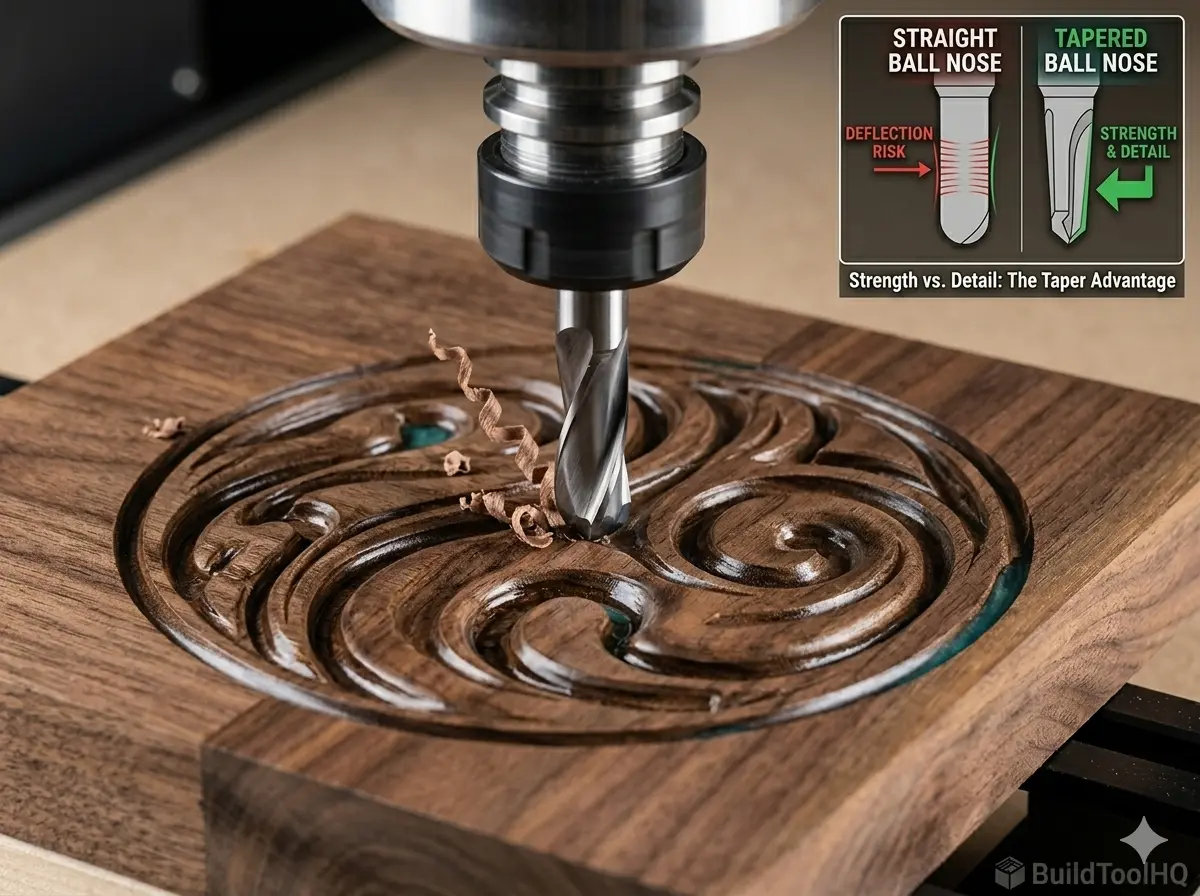
    The primary limitation of a standard ball nose is its structural integrity. If you are carving a high-detail 3D relief, you might need a tip as small as 1.5mm. In a standard ball nose, the entire shaft of the tool is 1.5mm thick. At 18,000 RPM, these tiny “needles” are incredibly prone to deflection (bending).

    When the bit bends, it creates “chatter” marks on the wood. Even worse, if it encounters a hard knot or an aggressive feed rate, the carbide will fatigue and snap instantly at the collet. This is a level of fragility you won’t find when using [Upcut vs. Downcut vs. Compression Bits: When to use each for edge finish].


    2. The Tapered Ball Nose: The 3D Carving Hero

    The tapered ball nose was engineered specifically to solve the “broken bit” problem in 3D wood carving. Instead of a thin cylinder, it features a thick, sturdy shank (usually 6mm or 1/4″) that “tapers” down at a specific angle (typically 3.8° or 5.4°) to a tiny, pinpoint tip.

    The Physics of Strength (Polar Moment of Inertia)

    By using a tapered body, the bit gains massive lateral strength. In physics terms, increasing the diameter of the tool toward the shank exponentially increases its resistance to bending. This rigidity allows you to increase your Feed Rate—sometimes by as much as 40%—without risking a tool break. This is the “BuildToolHQ” secret to finishing long 3D jobs faster. Achieving this level of stability is as critical as the chip-clearing logic found in [Aluminum Cutting with CNC: Single-flute secrets and lubrication].


    3. Ball Nose vs. Tapered Ball Nose: The Key Nuances

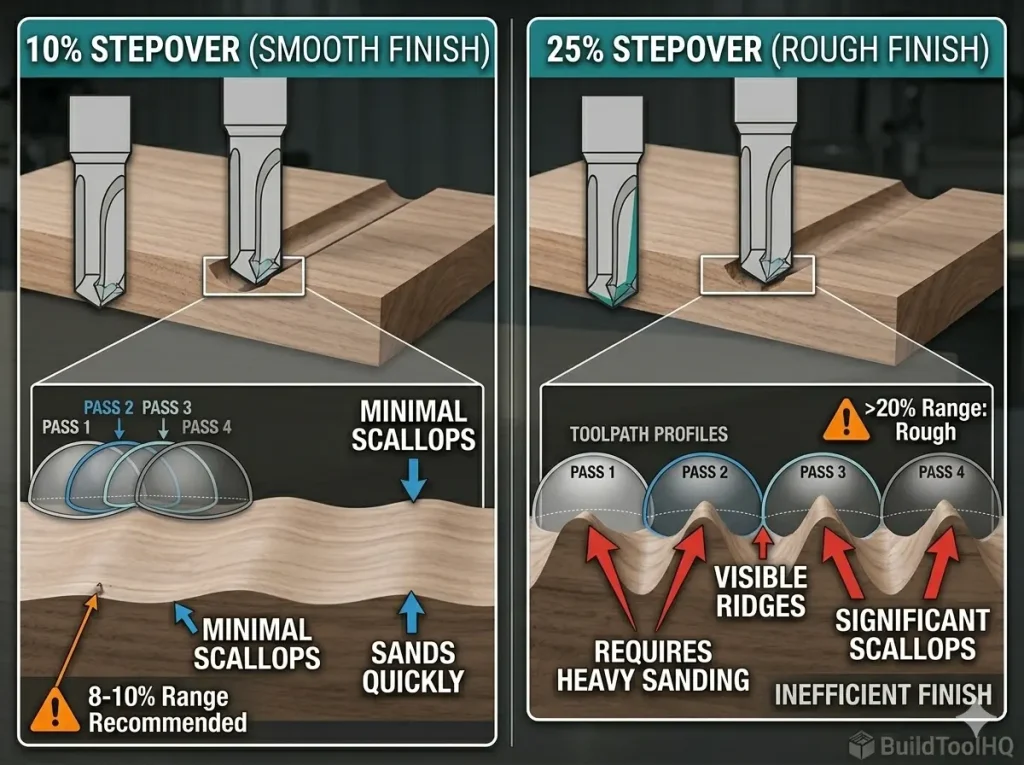
    Ball Nose vs. Tapered Ball Nose : Comparison diagram of CNC stepover percentages showing the scalloping effect on a 3D surface.
    The difference between a 10% stepover (smooth finish) and a 25% stepover (visible ridges). Proper stepover selection is the BuildToolHQ secret to quality results and minimum sanding time.

    The smoothness of your finish is determined by your Stepover. When comparing ball nose vs. tapered ball nose for your next project, consider these professional factors:

    A. Reach and Clearance

    Tapered bits are superior for deep carvings. Because the bit gets wider as it goes up, the “shoulder” of the tool is less likely to rub against the vertical walls of a deep pocket compared to a straight-shank bit. However, the taper itself requires more horizontal clearance at the top of the cut.

    B. The “Scallop” Effect and Stepover

    Both tools leave behind “scallops”—tiny ridges between each horizontal pass.

    • The Rule of Thumb: For a professional 3D finish, a stepover of 8% to 10% of the tip diameter is the sweet spot.
    • Diminishing Returns: Dropping below 8% adds hours to your machine time with almost no visible improvement in surface quality.

    C. Material Interaction


    4. The Professional 3D Workflow

    To achieve a “sand-free” finish, you should never rely on a single tool. Follow this three-step process:

    1. The Roughing Pass: Use a 1/4″ upcut spiral bit to remove the bulk of the material. Set a “Machining Allowance” of 0.5mm.
    2. The Finishing Pass: This is where the ball nose vs tapered ball nose debate is settled. Use the tapered bit with a 10% stepover.
    3. The Rest Machining Pass: If your model has tiny crevices that a 1.5mm bit can’t reach, run a final pass with a 0.25mm tapered bit.

    Pro Tip: Always verify that your spoilboard is perfectly flat using a [Surfacing bit for CNC router] before starting a long 3D carve.


    5. Setting Up Your Software (The Taper Angle Trap)

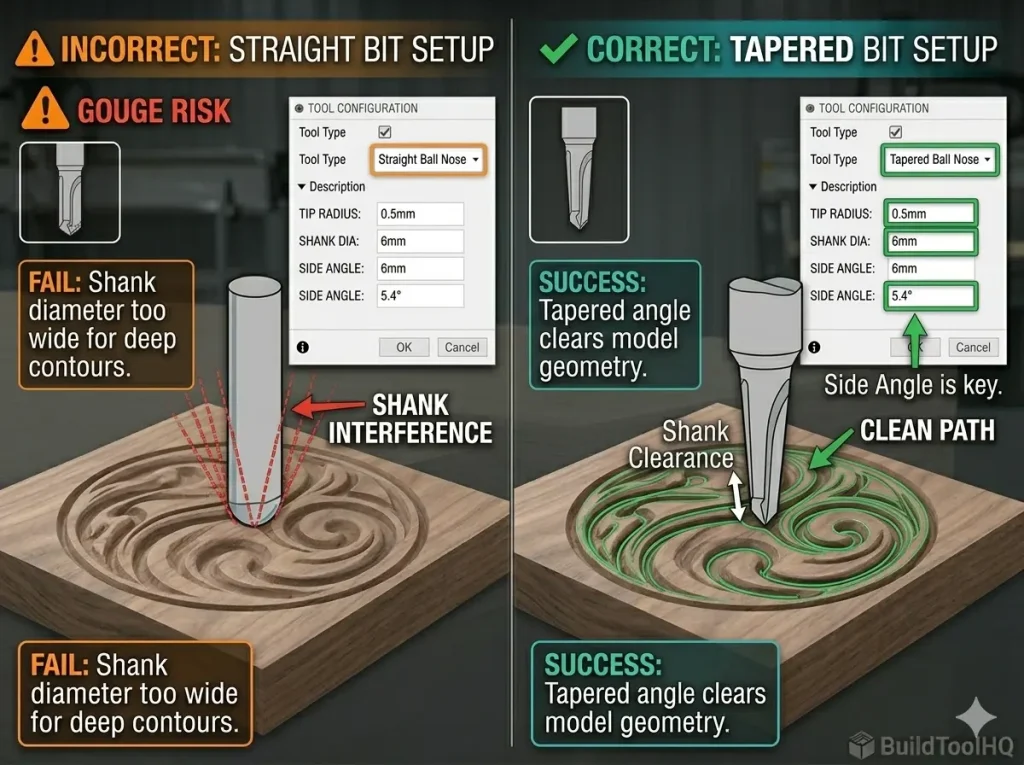
    Comparison of correct and incorrect CNC software configuration settings for a tapered ball nose bit.
    Preventing Gouges: Ensure your software knows you are using a Tapered Ball Nose. Entering the correct side angle (right) prevents the wide part of the taper from gouging your 3D model, as seen on the incorrect straight bit setup (left). This is the BuildToolHQ secret to quality results.

    The most common mistake when switching to a tapered ball nose is failing to update your tool database. If your software thinks you are using a straight bit, but you are using a tapered one, the machine will “gouge” the top of your model as the wider taper moves through a tight space.

    Required Data Points for CAM:

    • Tip Radius: Half the tip diameter (e.g., 0.5mm radius for a 1mm bit).
    • Side Angle: The specific degree of the taper (usually 3.8°, 5.4°, or 6.2°).
    • Clearance Diameter: The diameter of the shank.

    6. Maintenance: Protecting Your 3D Assets

    3D carving passes can run for 6 to 12 hours. This sustained friction generates heat that can dull carbide.

    Frequently Asked Questions (FAQ)

    Can I use a straight ball nose bit for roughing passes?

    No. Using standard, small-diameter straight ball nose bits for roughing passes is highly inefficient. They are not designed to remove bulk material. Instead, you should always perform a preliminary “Roughing Pass” with a (flat-bottom upcut spiral bit) to remove most of the material in steps. This leaves just a thin (0.5mm) skin of material for the tapered ball nose to clean up.

    How do I input a tapered bit into VCarve, Fusion 360, or Vectric software?

    This is the “Taper Angle Trap” discussed in Section 5. You cannot simply select “Ball Nose” for a tapered bit. Most CAM software requires you to explicitly set the “Tool Type” to “Tapered Ball Nose.” In the settings, you must input the Tip Radius (half the diameter), the Shank Diameter (e.g., 6mm), and the correct Side Angle (typically 3.8° or 5.4°). Failing to add the angle will cause the bit to gouge your 3D model.

    Will a tapered ball nose bit help with epoxy river tables?

    Yes. Tapered bits are excellent for leveling 3D epoxy surfaces or cutting detailed channels for “inlays” within resin. Because a tapered bit has more mass than a straight bit, it dissipates heat far more effectively. This is crucial for cutting plastics, as excessive heat will melt the epoxy rather than slicing it, gumming up the bit flutes.

    How do I choose the right tip radius for my 3D carving?

    Choosing the right tip radius (0.25mm, 0.5mm, 1mm) is a balance between detail and machine time. A tiny 0.25mm tapered bit can carve intricate facial features, but requires a very low stepover (e.g., 8%), which makes the cutting pass take hours. For standard 3D relief carvings or topographical maps, a 0.5mm or 1mm tip radius is usually the best professional compromise, providing clean detail without excessive machining time.

  • 7 Rules for Using Surfacing and Slab Leveling Bits: Mastering Large-Area Clearing

    7 Rules for Using Surfacing and Slab Leveling Bits: Mastering Large-Area Clearing

    Choosing the right surfacing bit for CNC router tasks is the secret to mastering large-scale projects like live-edge slab leveling and high-end epoxy production. When you face a twisted 8-foot slab of walnut or a messy spoilboard, a standard $1/4″$ spiral bit is an exercise in futility. To dominate these challenges, you must understand the specialized geometry of Surfacing and Slab Leveling Bits.

    This guide is designed to move you past basic profiling and into the specialized art of high-volume facing operations. If you are just starting your tooling journey, ensure you first bookmark our [The Ultimate Guide to CNC Router Bits: Selection, Speeds, and Materials] for foundational terminology. For a breakdown of bits optimized for clean profiles in composite wood, see our guide on the [Best CNC Bits for Plywood and Hardwoods: A deep dive into wood-specific geometry].


    1. The Large-Area Challenge: Why Surfacing Bits Rule

    The primary limitation of a standard CNC bit is its Surface Feet per Minute ($SFM$). A small $1/2″$ bit at 18,000 RPM is cutting a finite amount of wood. To clear a wide area efficiently, you need the massive diameter of Surfacing and Slab Leveling Bits to cover more ground with every rotation.

    A specialized surfacing bit for CNC router machines solves the area challenge through three critical design elements:

    • Large Effective Diameter (Typically 1.5″ to 3″+): To maximize facing area per pass.
    • Indexable Carbide Inserts: Unlike a brazed spiral, high-quality surfacing bits use replaceable cutters.
    • High Shear Angle Geometry: The cutters are angled to slice through the wood rather than “plow,” significantly reducing chatter and improving finish quality.

    This geometry makes them ideal for two distinct jobs: CNC slab leveling and spoilboard surfacing. While often sold under different names, they use the same engineering principles as the high-speed geometries discussed in [Upcut vs. Downcut vs. Compression Bits: When to use each for edge finish].


    2. Best Bits for CNC Slab Leveling: The Technical Choices

    When you are tackling expensive lumber with significant “twist” or “cupping,” your tool choice is critical. Your selection impacts both the time you spend flattening and the hours you spend sanding afterward.

    Indexable Insert Surfacing Bits (The Professional Standard)

    These are the undisputed champions of large-scale surfacing. They use solid tungsten carbide inserts secured by screws. When a cutting edge becomes dull or chipped, you simply loosen the screw and rotate the insert to a fresh edge.

    • The E-E-A-T Secret: Insert tooling allows you to change the material-specific geometry. For harder woods like Maple, you can install an insert with a negative rake to reduce tear-out.

    Brazed Tungsten Carbide (TCT) Surfacing Bits (Budget-Friendly)

    These bits have solid carbide wings welded onto a steel body. They are significantly cheaper but are disposable—when they are dull, you must replace the entire bit. They lack the specialized durability we cover in [Diamond Coated & Specialized Bits: For composites and abrasive materials], making them poor choices for abrasive resin work.


    3. Mastering the Geometry: Face Cutting vs. Peripheral Cutting

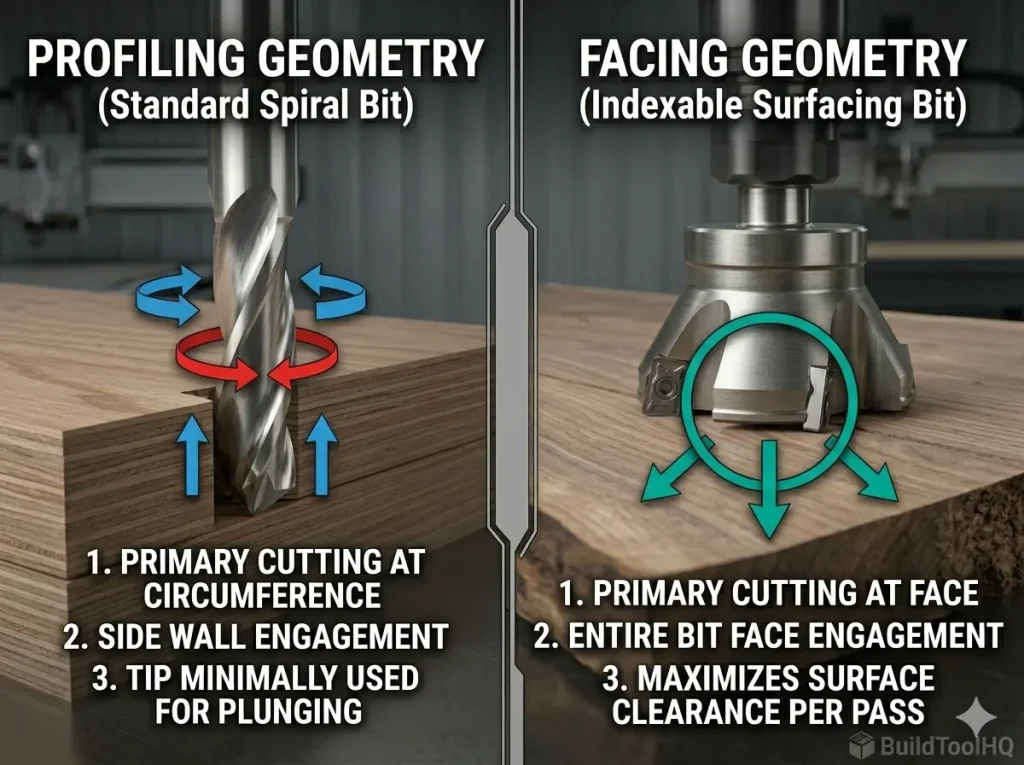
    Diagram comparing facing geometry vs peripheral profiling geometry for CNC router bits.
    Understanding the fundamental geometry shift: Standard spiral bits cut primarily with their vertical circumference (peripheral cutting). Indexable surfacing bits (like the 3" model shown) are designed for exclusive **face cutting**, leveraging the massive surface area of the tool's end to clear material quickly.

    To truly understand surfacing, you must grasp the difference between how a spiral bit cuts and how Surfacing and Slab Leveling Bits cut. A standard bit is a peripheral cutter; its helical flutes cut around the circumference.

    A surfacing bit is a face cutter. The entire engaged surface of the tool is in constant contact with the material, creating massive friction. Because the diameter is so large, the “Surface Feet per Minute” at the edge of a $3″$ bit is much higher than a $1/4″$ bit at the same RPM.

    • The Calculation: $SFM = \frac{Diameter \times \pi \times RPM}{12}$.
    • If you run a $3″$ surfacing bit at 18,000 RPM, the edge is moving at over 14,000 feet per minute—this will ignite wood instantly. You must lower your RPM to manage this heat.

    4. Maintenance: Keeping the Facing Edge True

    In surfacing, your machine’s rigidity is the ultimate constraint. A wide-diameter tool amplifies any flex in your gantry. If your machine isn’t perfectly rigid, you will see visible “ridges” or a “washboard effect.” This is far more pronounced in surfacing than in the precision detail work of [V-Carve Bits and Sign Making: Achieving crisp detail and sharp corners].


    5. Maintenance: Protecting the Surface Quality

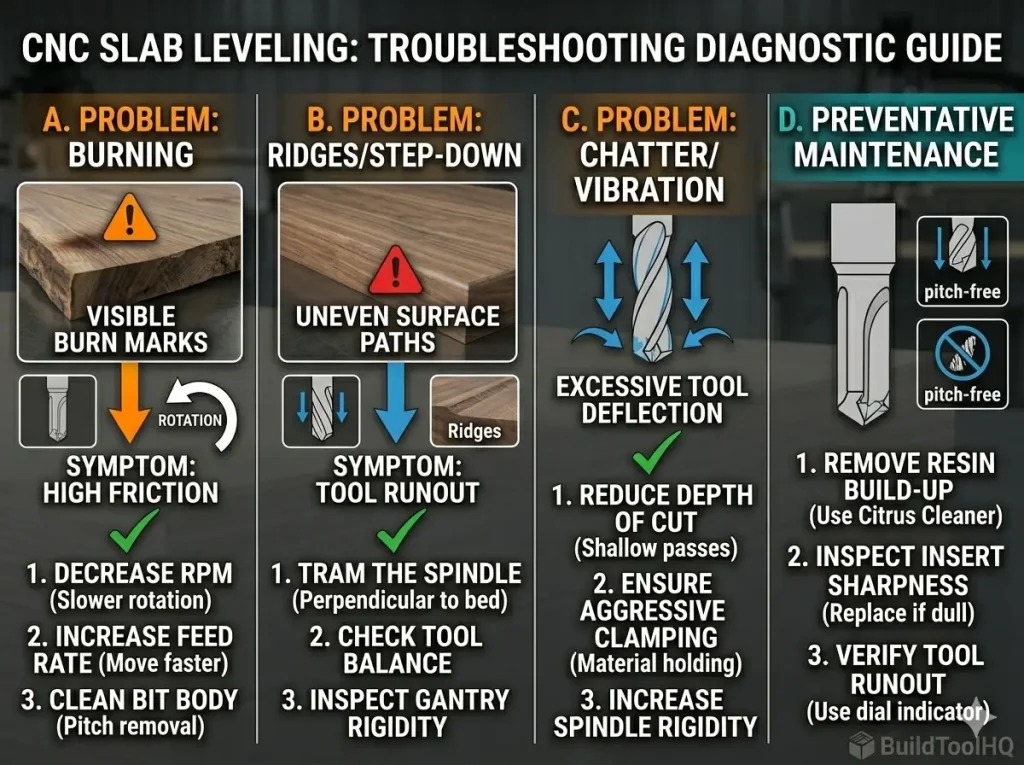
    Troubleshooting chart for CNC slab leveling showing burning, ridges, and chatter fixes for BuildToolHQ guide.
    A professional diagnostic guide to solving common surfacing failures: Burning (RPM/Feed), Ridges (Tramming/Deflection), and Chatter (Depth/Rigidity). By focusing on these indicators, you achieve high-performance results for **surfacing bits for CNC router** operations.

    Surfacing and Slab Leveling Bits work harder than almost any other tool. Their geometry, which maximizes wood contact, is also highly prone to accumulation of pitch and sap.

    • Clean Your Bits: After every major surfacing operation, soak the bit body in a citrus-based pitch cleaner. Built-up resin increases friction and heat.
    • Inspect Insert Sharpness: Don’t wait until you see smoke. A surfacing operation should produce clean, uniform chips (like shaved coconut), not fine dust.
    • Storage: For a full breakdown of tool care, refer to [CNC Bit Maintenance: Sharpening, cleaning, and storage for longevity].

    6.Dealing with Specialized Materials (Epoxy and Hybrid Slabs)

    If you are leveling epoxy river tables, Surfacing and Slab Leveling Bits are essential, but you must move fast.

    7.Diagnostic: Troubleshooting Your Flattening Passes

    If your Surfacing and Slab Leveling Bits are leaving poor results, use this checklist:

    • Visible Ridges? Your machine is not properly trammed. The spindle must be $90^\circ$ to the bed.
    • Wood is Burning? Your RPM is too high. Decrease your RPM and increase your feed rate. We cover the exact mathematics of determining this in our section on [Aluminum Cutting with CNC: Single-flute secrets and lubrication] (thermal principles remain the same).
    • Violent Vibration? Your depth of cut is too aggressive. Decrease your “step-down” to $0.5mm$.

    Final Summary for BuildToolHQ Readers

    To win the fight against large, warped slabs, you must use the correct weapon:

    • For High-Value Live-Edge Slabs: Use a 2.5″ – 3″ Indexable Insert Surfacing Bit for the best finish.
    • For General Spoilboard Surfacing: Use a 1.5″ – 2″ Brazed TCT Surfacing Bit.
    • For Complex Hardwood Contouring: Use Ball Nose or V-Bits (Not surfacing bits).

    By understanding the unique “facing” geometry of these tools, you transform a time-consuming chore into a satisfying foundation for your finest woodworking projects.

    Frequently Asked Questions (FAQ)

    What is the best RPM for a CNC surfacing bit?

    Unlike small 1/4″ bits, large surfacing bits must be run at lower speeds. For a 2.5″ diameter bit, you should set your spindle between 10,000 and 12,000 RPM. High RPMs on a large tool create excessive surface speed, which leads to immediate wood burning and dulls your carbide edges prematurely.

    How deep can I cut with a surfacing bit in one pass?

    For most CNC machines, you should limit your depth of cut to 0.5mm to 1.0mm (0.02″ to 0.04″) per pass. Because surfacing bits have such a large diameter, cutting too deep creates massive leverage on your spindle and gantry. Shallow passes are the secret to preventing the “washboard” ridges caused by machine flex.

    Can I use a surfacing bit on a handheld router?

    No. Using a large-diameter (2″+) surfacing bit in a handheld router is extremely dangerous. These bits are engineered for the rigid, controlled movement of a CNC gantry. The high torque and “kickback” potential of such a wide tool can easily cause you to lose control of a handheld machine.

    How do I know when to rotate the carbide inserts?

    You should rotate your inserts if the bit begins producing fine dust instead of clean, shaved wood chips. Other warning signs include visible “fuzzing” on the wood surface, burn marks appearing on the material, or a noticeable increase in spindle “screaming” or vibration.

    Will a surfacing bit work on epoxy resin?

    Yes. Indexable surfacing bits are excellent for leveling epoxy river tables. However, epoxy is very abrasive. Ensure you are using a high feed rate to keep the bit moving; if the bit dwells too long in one spot, it will melt the resin rather than cutting it.

  • Best CNC Bits for Plywood and Hardwoods: A Deep Dive into Wood-Specific Geometry

    Best CNC Bits for Plywood and Hardwoods: A Deep Dive into Wood-Specific Geometry

    Choosing the right tool for the job is the difference between a professional finish and a wasted sheet of expensive Baltic Birch. While many beginners treat CNC bits as “one-size-fits-all,” experienced makers know that wood-specific geometry is the secret to high-speed, high-quality production.

    In this guide, we are breaking down the best CNC bits for plywood and hardwoods, explaining the mechanical physics of why certain geometries succeed where others fail. If you are just getting started, make sure to bookmark our [The Ultimate Guide to CNC Router Bits: Selection, Speeds, and Materials] as your foundational reference for all tooling terminology and chip load formulas.


    1. The Plywood Physics: Why Standard Bits Fail

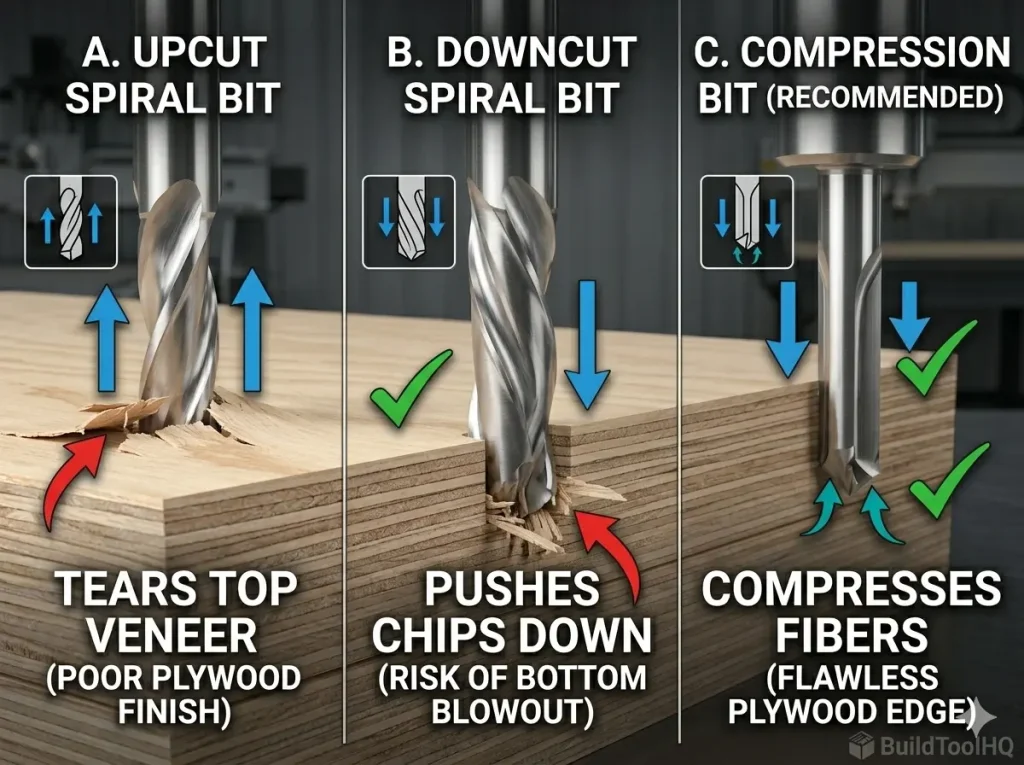
    Technical comparison of chip flow geometry for standard upcut, downcut, and compression CNC bits for plywood.
    Understanding the “why” behind the geometry: Standard bits either pull up or push down. Compression geometry (C) uniquely shears in both directions toward the center, protecting fragile plywood veneers from tear-out and blowout.

    Plywood is a “composite” material made of alternating layers of Plywood is a “composite” material made of alternating layers of wood grain and glue. This creates two distinct challenges for a CNC router that solid lumber does not present: inter-laminar shear and veneer fragility.

    1. Top-Layer Tear-out: The fragile veneer on the top surface is prone to lifting because it has no support from above.
    2. Bottom-Layer Splintering: As the bit exits the material, the downward force of the tool can blow out the bottom veneer.

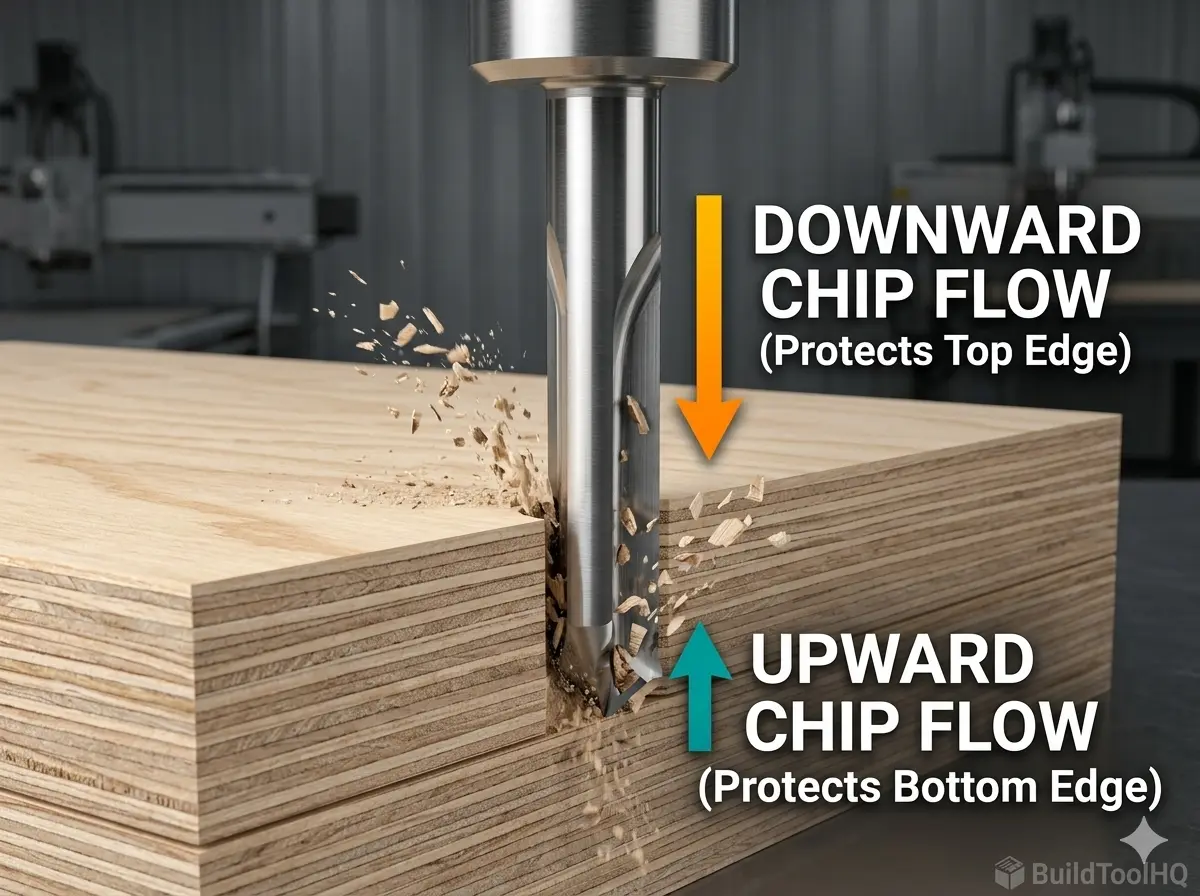
    Standard upcut bits act like a hook on plywood veneers, pulling them upward and away from the core. Conversely, a downcut bit protects the top but can cause “blowout” on the bottom as it pushes chips into the wasteboard. To solve this, we move toward Compression Geometry. If you haven’t seen the visual difference in action, check out our deep dive on [Upcut vs. Downcut vs. Compression Bits: When to use each for edge finish].


    2. Top Recommendations for the Best CNC Bits for Plywood

    For high-volume production or high-end cabinetry, these three tools are essential in your kit to ensure a zero-sanding finish.

    A. The Compression Bit (The Gold Standard)

    This is the undisputed king of plywood. By combining an upcut tip with a downcut shank, it “compresses” the wood fibers toward the center of the board.

    • The Secret: It creates a “shearing” action from both the top and the bottom simultaneously. This results in a “butter-smooth” edge that is ready for edge-banding immediately after the cut.

    B. The Mortise Compression Bit (For Thin Sheets)

    Standard compression bits often have an upcut section (the “toe”) that is too long for $1/4″$ ($6mm$) or $12mm$ plywood. This causes the upcut portion to reach the top surface, causing the very tear-out you were trying to avoid.

    • The Solution: A Mortise Compression bit has a significantly shorter upcut section (usually around $3mm$ to $5mm$). This allows the downcut portion of the bit to engage the top veneer even on thin material.

    C. The Straight Flute Bit (The Cost-Effective Workhorse)

    While spiral flutes are popular for high-speed clearing, straight flute bits are excellent for plywood because they exert zero vertical force. They don’t pull up, and they don’t push down. While they struggle with chip evacuation compared to [O-Flute Bits for Plastics and Acrylics: Managing heat and preventing melting], they are a fantastic, budget-friendly choice for simple profile cuts and nesting.

    3. Mastering Hardwoods: Oak, Maple, and Walnut

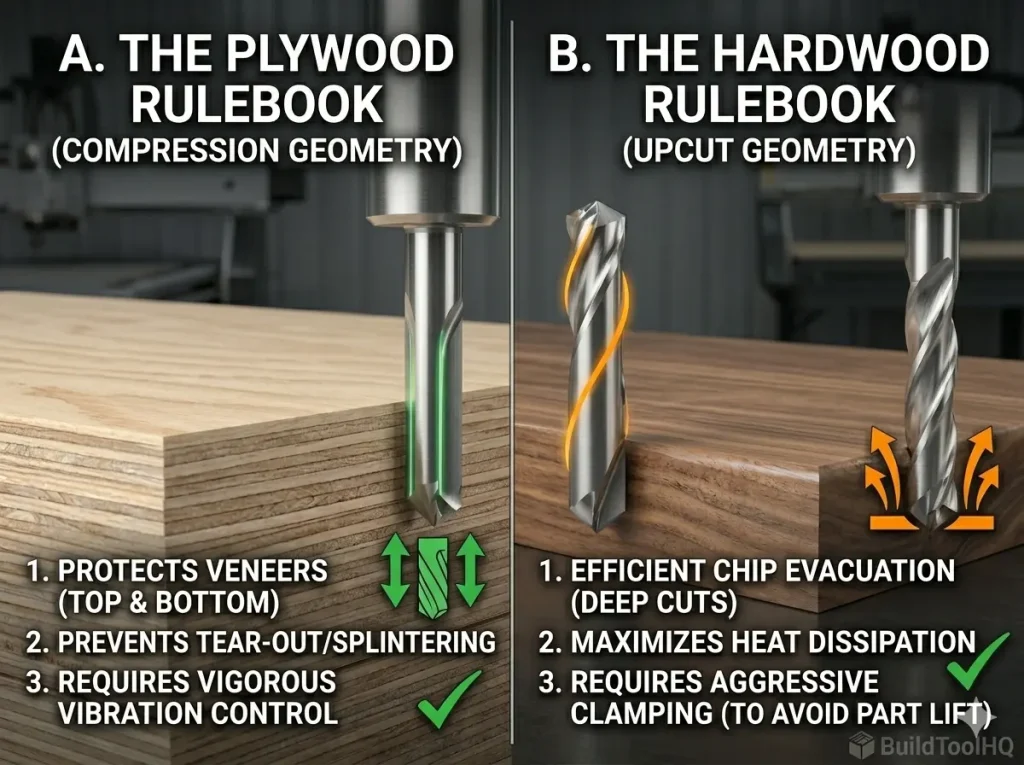
    CNC Router Bit selection rulebook comparing compression geometry for plywood and upcut geometry for hardwood.
    Understanding the material shift: Plywood (Left) demands compression geometry to safeguard delicate layers. Solid Hardwood (Right) prioritizes upcut spirals for heat management and rapid chip clearance—a trade-off that risks surface quality for tool life.

    While plywood requires compression to save the veneers, solid hardwoods demand heat management and grain awareness. Solid wood is a cellular structure, and the way your bit interacts with those cells determines your finish quality.

    Chip Evacuation in Deep Pockets

    When carving deep mortises in hardwood, heat is your primary enemy. An Upcut Spiral bit pulls chips out of the hole rapidly. This prevents the bit from “re-cutting” sawdust. Re-cutting chips is the primary cause of friction, which leads to tool burn and ruins the temper of your carbide.

    Roughing vs. Finishing Strategies

    For complex hardwood projects, we recommend a two-tool strategy:

    1. The Roughing Pass: Use a large $1/4″$ or $1/2″$ Upcut Spiral to clear bulk material quickly.
    2. The Finishing Pass: Use a [Ball Nose vs. Tapered Ball Nose: The nuances of 3D carving and finishing passes] bit to “clean up” the final $0.5mm$ of material for a glass-like finish.

    4. Nested Manufacturing: Maximizing Your Sheet Goods

    Not every wood project is a simple square cut. Depending on your design, you may need to pivot to specialized tools:


    5. Technical Diagnostic: Troubleshooting Your Wood Cuts

    If you are seeing poor results, use this checklist to diagnose the issue:

    Bit “Screaming”? This is often a sign of tool deflection or a chip load that is too small. Re-check your math in the [The Ultimate Guide to CNC Router Bits: Selection, Speeds, and Materials].

    Burning on Hardwood? Your feed rate is too slow. The bit is rubbing instead of cutting. This is common when using the same speeds for wood as you would for [Aluminum Cutting with CNC: Single-flute secrets and lubrication]. You must increase your IPM (Inches Per Minute) to keep the carbide cool.

    Fuzzing on Plywood Top? Your upcut “toe” is reaching the top surface. Switch to a Mortise Compression bit or increase your depth of cut on the first pass.


    6. Maintenance: Protecting Your Carbide Investment

    Even the best bits will fail if they are covered in “pitch” (dried sap and resin). Pitch buildup increases friction, which increases heat, which kills the razor edge of your tool.

    • Clean After Every Run: Use a dedicated citrus-based cleaner or a blade-and-bit soak.
    • Check for “Blueing”: If your bit looks blue or rainbow-colored, it has overheated. This softens the carbide.
    • Storage: Carbide is brittle. If two bits “clink” together, the edges can micro-chip. For a full storage and cleaning protocol, see our guide on [CNC Bit Maintenance: Sharpening, cleaning, and storage for longevity].

    Final Summary for BuildToolHQ Readers

    Building a “topical authority” in your workshop means matching thBuilding a “topical authority” in your workshop means matching the tool to the fiber:

    • For Cabinetry & Plywood: Invest in a high-quality $1/4″$ Compression bit.
    • For Solid Hardwood Furniture: Use Upcut Spirals for bulk removal and Ball Nose for detail.
    • For Thin Veneered Panels: Always reach for the Mortise Compression.

    By understanding wood-specific geometry, you drastically reduce your post-processing time. Remember: Five minutes of tool selection saves five hours of sanding.

    Can I use a compression bit for every plywood cut?

    While compression bits are the gold standard, they have a “minimum depth” requirement. For the compression effect to work, the upcut portion (the tip) must be fully buried in the material so the downcut portion can engage the top veneer. If you are doing shallow decorative grooves, a compression bit will act like an upcut bit and cause tear-out. For shallow work, reach for a dedicated downcut spiral.

    Why does my hardwood keep burning even with a sharp bit?

    Burning is usually a symptom of a low chip load. If your RPM is too high and your feed rate is too slow, the bit “rubs” the wood fibers instead of slicing them. This friction generates heat that chars the wood.
    The Solution: Increase your travel speed (IPM) or lower your spindle RPM. For the exact math, revisit our [The Ultimate Guide to CNC Router Bits: Selection, Speeds, and Materials].

    What is the difference between a “Mortise” compression and a standard one?

    A Mortise Compression bit has a much shorter upcut “toe” (usually $3mm$ to $5mm$). This is designed specifically for thin sheet goods ($1/4″$ or $1/2″$). If you use a standard compression bit on thin plywood, the upcut flutes will reach the top surface and splinter the veneer.

    Should I use a single-flute or double-flute bit for hardwood?

    For most woodworking, a two-flute bit is the standard as it provides a cleaner finish. However, if you are cutting extremely “gummy” woods or need to move very fast, a single-flute (similar to what we use in [Aluminum Cutting with CNC: Single-flute secrets and lubrication]) can help with heat dissipation.

    Is it okay to use “Downcut” bits for deep pockets in Oak or Maple?

    We generally advise against this. Because downcut bits push chips into the bottom of the cut, they can cause heat to build up rapidly in deep pockets, which may lead to smoke or even fire. For deep clearing in hardwoods, always use an upcut spiral to ensure chips are evacuated safely.

    How do I prevent “fuzzies” when cutting softwoods like Pine?

    Softwoods have long, flexible fibers that tend to bend rather than cut cleanly. Using a downcut bit is the best way to “trap” those fibers against the grain and shear them off. If you’re still seeing fuzz, ensure you aren’t using a bit meant for harder materials, like those found in [Diamond Coated & Specialized Bits: For composites and abrasive materials], as they may not be sharp enough for soft fibers.

  • Upcut vs. Downcut vs. Compression: The Ultimate CNC Edge Quality Guide

    Upcut vs. Downcut vs. Compression: The Ultimate CNC Edge Quality Guide

    In the world of precision manufacturing, your CNC machine is only as capable as the few millimeters of carbide meeting the workpiece. For the BuildToolHQ community, understanding the difference between Upcut vs. Downcut CNC bits versus Compression tooling isn’t just about knowing which shape to buy—it’s about mastering the intersection of material science, geometry, and mechanical physics.

    Understanding the nuances between Upcut vs Downcut CNC bits is essential for any CNC machining project.

    Familiarizing yourself with Upcut vs Downcut CNC bits can lead to superior results in your crafting.

    Choosing the wrong geometry results in more than just a “bad cut.” It leads to workholding failure, shortened spindle life, and potentially dangerous tool breakage. This guide is designed to transform you from a “user” into a “technician,” providing a deep dive into Upcut vs Downcut CNC bits and Compression bits so you can achieve a zero-sanding finish every time.

    As we established in our foundational [The Ultimate Guide to CNC Router Bits: Selection, Speeds, and Materials], the way a tool interacts with wood fibers dictates the success of the entire carve.

    1. The Physics of the Cut: Why Geometry Matters

    When discussing Upcut vs Downcut CNC bits, it’s important to consider their impact on different materials.

    A proper understanding of Upcut vs Downcut CNC bits ensures better finishes on your projects.

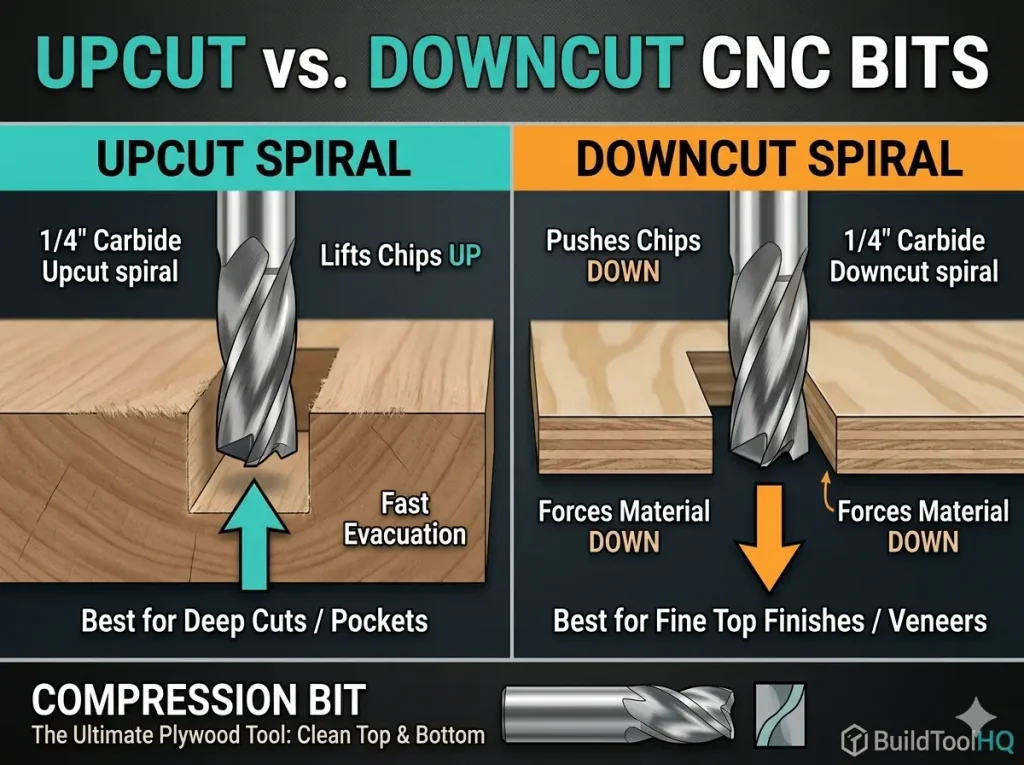
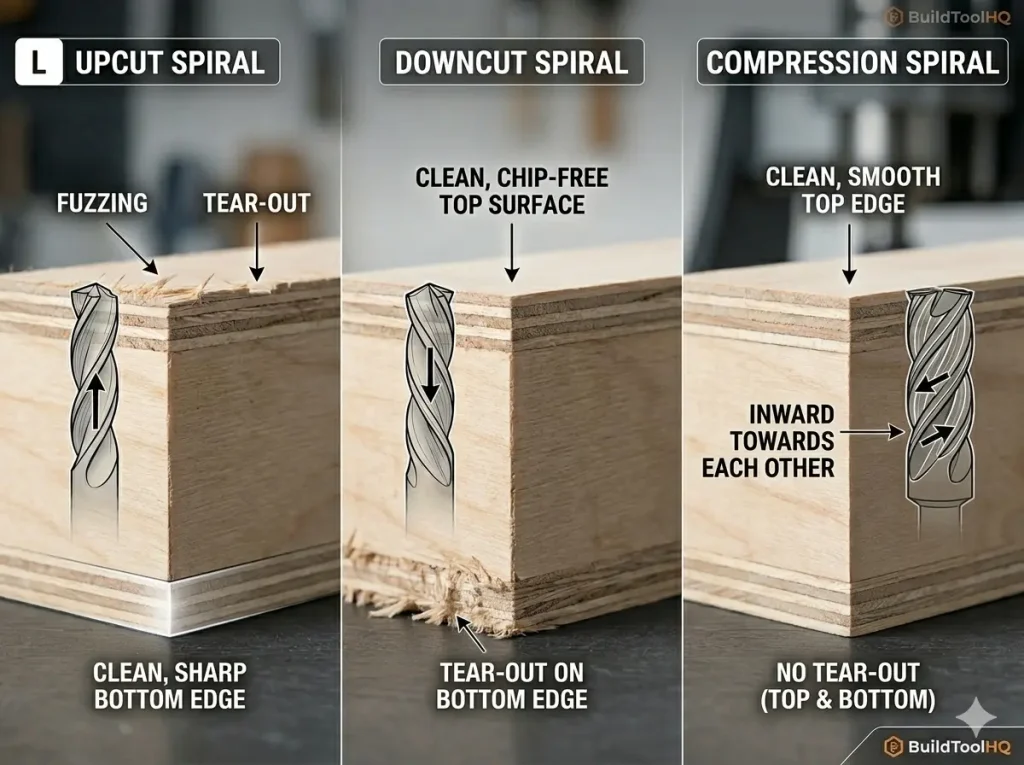
    Side-by-side comparison of plywood tear-out using upcut vs downcut CNC bits for edge quality.
    Notice the severe splintering on the left caused by an upcut bit pulling fibers upward, compared to the clean finish on the right.

    To master the selection of Upcut vs Downcut CNC bits and Compression bits, you first have to understand how wood reacts to a spinning blade at high RPM. Wood is not a solid block; it is a bundle of cellulose fibers. If you pull those fibers away from their support (the rest of the board), they splinter—this is the “tear-out” that ruins expensive slabs.

    The “spiral” or “flute” of a CNC bit acts like a screw thread. Depending on the direction of that screw, the bit is either pushing those fibers into the wood core or pulling them out. The choice between Upcut vs. Downcut vs. Compression is essentially a choice of where you want the “stress” of the cut to be directed.

    2. The Upcut Spiral: The Workhorse of the Shop

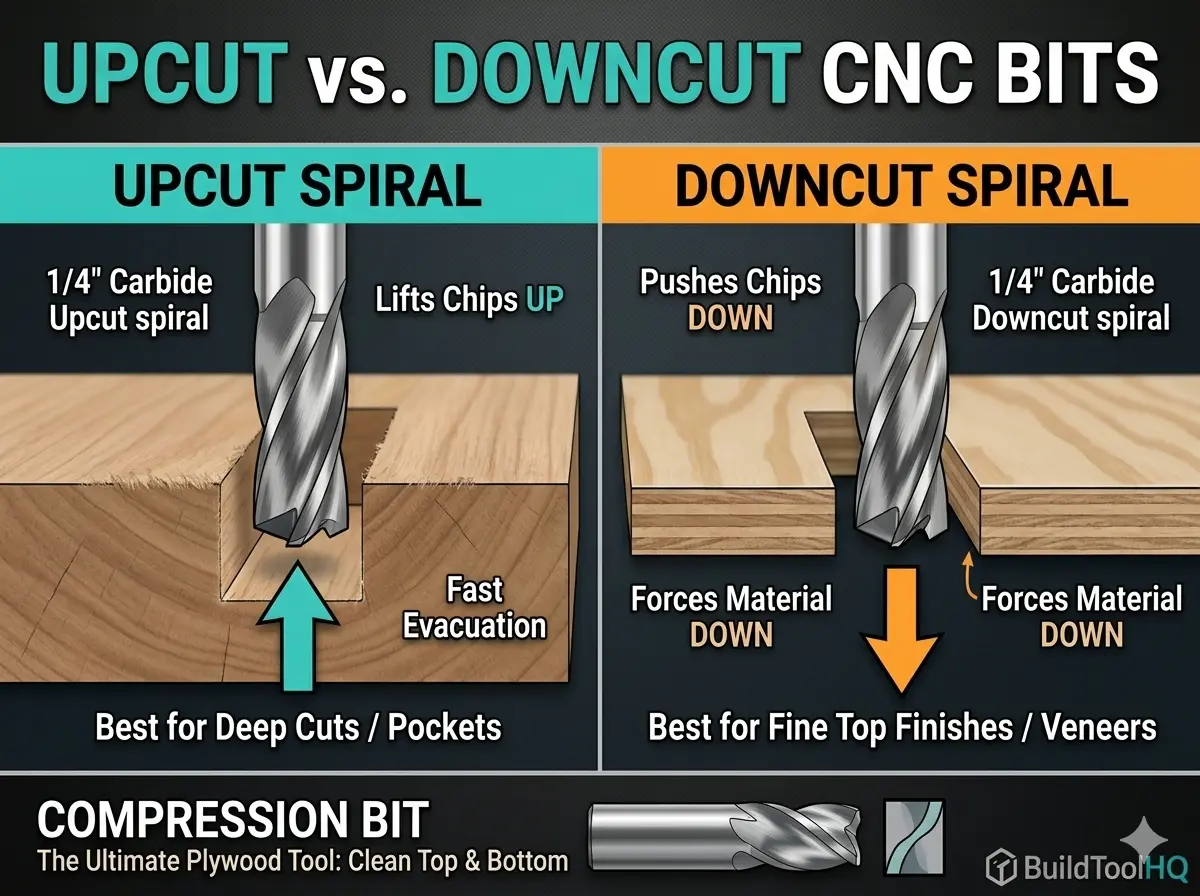
    The Upcut spiral is the most common tool for a reason: it is incredibly efficient at moving material and evacuating heat.

    Mechanical Action & Airflow

    The flutes wrap upward toward the shank. As the bit spins, it acts like a high-speed vacuum, pulling chips and heat up and away from the workpiece. This creates a “cooling effect” that preserves the life of your carbide.

    • The Pro: Superior chip evacuation. This is vital for deep mortises or slotting where chips would otherwise get trapped, causing “re-cutting” and friction fire.
    • The Con: It pulls the top surface fibers up. On materials like Baltic Birch plywood or melamine, this results in a “fuzzy” or splintered top edge that requires heavy sanding.
    • Best Use Case: Roughing passes, cutting solid natural wood where the top edge will be rounded over, or deep slotting where bit breakage is a concern.

    If you are calculating your chip load to prevent tool wear, remember that the upcut bit is the most forgiving geometry for heat management. See our core guide on [The Ultimate Guide to CNC Router Bits: Selection, Speeds, and Materials] for the specific physics of heat dissipation.

    In summary, understanding Upcut vs Downcut CNC bits can greatly enhance your proficiency.

    For detailed work, the choice of Upcut vs Downcut CNC bits can greatly influence the outcome.

    3. The Downcut Spiral: Precision for the “Show Side”

    If your project relies on a perfect top surface—like the intricate details found in [V-Carve Bits and Sign Making: Achieving crisp detail and sharp corners]—the Downcut bit is your best friend.

    The Downward Pressure Advantage

    The flutes on a downcut bit are reversed. As the tool rotates, it shears the wood fibers downward, pressing them against the core of the material.

    • The Pro: It creates a flawlessly clean top edge. Because it pushes down, it also acts as an “extra clamp,” helping hold thin materials flat against the wasteboard without the part lifting.
    • The Con: It pushes chips into the cut. In deep grooves, these chips can pack tightly, leading to heat buildup or “charring” on the edges.
    • Technical Tip: To run a downcut bit safely, you must use high-quality carbide. We discuss the thermal benefits of different coatings in our section on [Diamond Coated & Specialized Bits: For composites and abrasive materials].

    For a crisp finish, understanding Upcut vs Downcut CNC bits is vital.

    4. The Compression Bit: The Best of Both Worlds

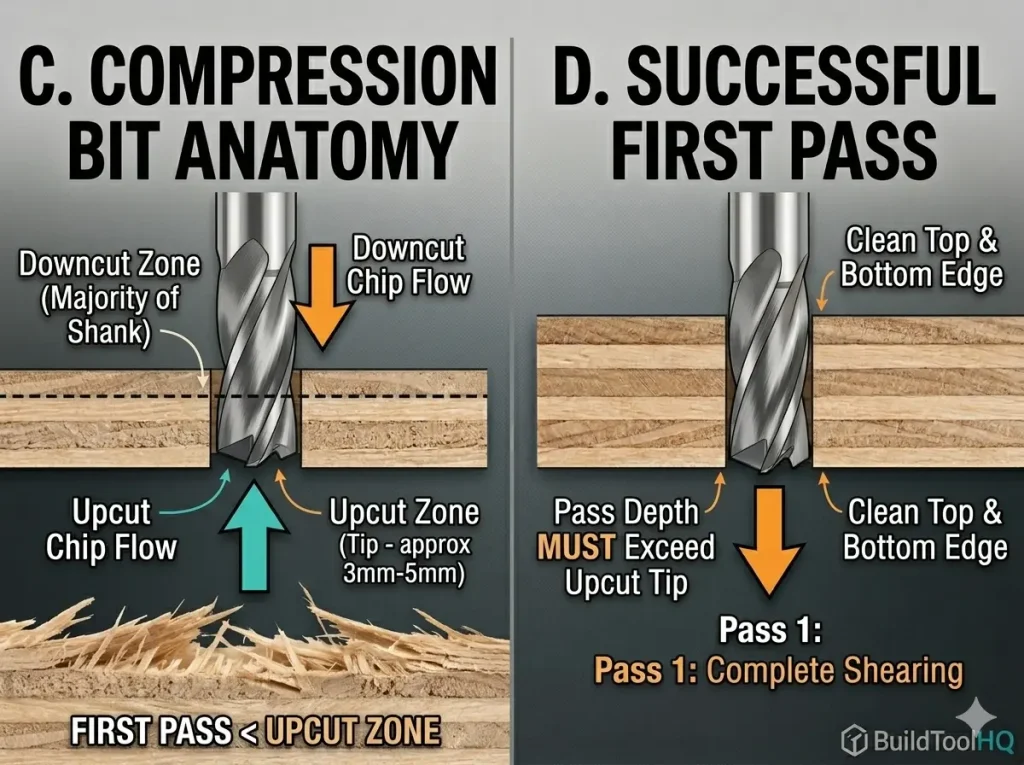
    Detailed anatomy of a compression bit showing upcut vs downcut CNC bits transition zone.
    A compression bit works by combining upcut and downcut geometries; the first pass must exceed the upcut length to protect the top surface

    Understanding Upcut vs Downcut CNC bits is critical for achieving the desired outcome.

    For professionals cutting double-sided laminates or expensive plywood, the Compression bit is the ultimate evolution of Upcut vs. Downcut vs. Compression technology.

    Your choice of Upcut vs Downcut CNC bits can greatly enhance the quality of your work.

    Understanding the “Transition Zone”

    A compression bit is a hybrid. The bottom 3-5mm of the bit features an upcut geometry, while the remainder of the cutting length is a downcut.

    In woodworking, the debate of Upcut vs Downcut CNC bits is crucial for optimal results.

    1. The Bottom: Pulls the bottom fibers up toward the center.
    2. The Top: Pushes the top fibers down toward the center.
    3. The Result: The material is “sandwiched,” leaving a clean, sharp edge on both sides of the board.

    Ultimately, the choice of Upcut vs Downcut CNC bits can determine your project’s success.

    Utilizing the right Upcut vs Downcut CNC bits is essential for high-quality finishes.

    The Golden Rule of Compression: Your first pass must be deeper than the upcut portion. If you only cut 2mm deep with a compression bit, you are only using the upcut part, and you will still get tear-out! This precision is similar to the “step-over” logic used in [Ball Nose vs. Tapered Ball Nose: The nuances of 3D carving and finishing passes].

    5. Material Matching Matrix

    Selecting the right tool depends entirely on your material. Below is a quick-reference guide for the BuildToolHQ community:

    Material TypeRecommended BitReason
    Baltic Birch PlywoodCompressionPrevents splintering on the veneer.
    Natural HardwoodUpcutBest for chip removal and tool cooling.
    Melamine / LaminateCompressionEssential for clean top/bottom edges.
    Softwood (Pine/Cedar)DowncutPrevents “fuzzing” on the soft fibers.
    Acrylic & PlasticsUpcut (O-Flute)Prevents melting by removing heat fast.
    MDFUpcut or DowncutMDF is uniform; choice depends on finish.

    When selecting tools, consider the implications of Upcut vs Downcut CNC bits.

    6. The Physics of Deflection and Rigid Seating

    One often overlooked aspect of choosing between Upcut vs. Downcut vs. Compression bits is how they affect tool deflection. Upcut bits exert “pulling” force, while downcut bits exert “pushing” force.

    To minimize “chatter” (vibration marks on your edge), you must ensure your bit is seated properly. Tool deflection increases by the cube of the length it protrudes from the collet. Always seat your bits as deeply as possible. For a guide on ensuring your collet is clean enough to handle this pressure, check out [CNC Bit Maintenance: Sharpening, cleaning, and storage for longevity].

    7. Troubleshooting Common Edge Issues

    Even with the right Upcut vs. Downcut vs. Compression bits, you might face these three common shop problems:

    The differences in Upcut vs Downcut CNC bits can ultimately affect your project quality.

    When using CNC tools, the differences in Upcut vs Downcut CNC bits can lead to varied results.

    A. Burnt Edges

    This usually happens with Downcut bits because the chips aren’t escaping. Solution: Increase your Feed Rate or decrease your RPM. You want the bit to “bite” the wood, not “rub” it.

    B. Part Shifting

    Proper knowledge about Upcut vs Downcut CNC bits allows for better project planning.

    The choice of Upcut vs Downcut CNC bits can prevent various machining issues.

    Upcut bits can pull small parts right off the table. Solution: Switch to a Downcut bit. The downward pressure acts as a mechanical clamp.

    C. Excessive Vibration

    Often caused by using a bit with too much “stick out” from the collet. This is especially common when using wide-diameter tools. Learn more about managing these forces in [Surfacing and Slab Leveling Bits: Mastering large-area clearing].


    8. Conclusion: Investing in the Right Tooling

    Mastering the choice of Upcut vs. Downcut vs. Compression bits is the fastest way to upgrade your shop’s output. While it is tempting to use a cheap upcut bit for everything, the time you save in sanding alone will pay for a specialized compression bit within a single project.

    Familiarity with Upcut vs Downcut CNC bits is a key factor for success in CNC operations.

    Keep your tools clean, calculate your chip loads carefully, and always match your geometry to your material. For a deeper look at the specific bits needed for cabinetry, revisit our guide on [Best CNC Bits for Plywood and Hardwoods: A deep dive into wood-specific geometry].

    Final Pro-Tip: The “Sound” of Success

    One often overlooked aspect of choosing between upcut vs downcut CNC bits is the acoustic feedback. Upcut bits tend to have a higher-pitched “scream” because they are actively vibrating the material upward. Downcut bits often sound more “muffled” because they are compressing the material against the table. If you hear excessive whistling or chatter, it may be time to revisit your Chip Load calculations or check for tool wear.

    Choosing between Upcut vs Downcut CNC bits can affect both aesthetics and functionality.

    The effectiveness of Upcut vs Downcut CNC bits can significantly impact your project timeline.

    Frequently Asked Questions:

    Why is my downcut bit burning the wood, but my upcut bit isn’t?

    Burning is almost always a result of heat being trapped in the cut. Because downcut bits push chips downward, they pack the “gullet” (the space between flutes) with sawdust. If your feed rate is too slow, the bit rubs against the same dust repeatedly, generating friction.
    The Fix: Increase your feed rate or decrease your RPM. You want the bit to slice off a physical chip that carries the heat away, rather than grinding wood into flour.

    Can I use a compression bit for shallow pocketing or engraving?

    Technically yes, but it won’t work as intended. A compression bit only “compresses” the fibers when the “upcut portion” at the tip is fully buried in the material. If you are only carving $2mm$ deep on a bit with a $5mm$ upcut length, you are effectively just using an upcut bit.
    The Pro Tip: For shallow work, stick to a dedicated downcut bit to ensure a crisp top edge.

    Which bit is safest for small parts that might fly off the table?

    When cutting small parts—especially those without a vacuum table—downcut bits are the safest choice. The downward spiral geometry exerts mechanical pressure that helps hold the part against the wasteboard. Conversely, an upcut bit acts like a corkscrew, trying to lift the part, which often leads to “part fly-off” and tool breakage.

    Do upcut vs. downcut vs. compression bits require different maintenance?

    The physics of the cut stays the same, but downcut and compression bits tend to accumulate resin faster because they don’t evacuate chips as efficiently as upcut bits. Resin acts as a thermal insulator, which “cooks” the carbide.
    The Fix: Check your bits every hour for “pitch” buildup. For the best cleaning protocols, refer to our guide on [CNC Bit Maintenance: Sharpening, cleaning, and storage for longevity].

    How do I know when my compression bit is dull?

    If you start seeing “fuzzing” or splintering on the top and bottom of your plywood, the transition zone of your compression bit is likely rounded over. You can also perform the “light reflection test” we detailed in the [The Ultimate Guide to CNC Router Bits: Selection, Speeds, and Materials] to see if the edge is reflecting light (a sign of dullness).

    Are these bits interchangeable for Aluminum or Acrylic?

    Generally, no. While you can use an upcut bit for metal, it is better to use specialized geometry. Aluminum is “gummy” and requires the single-flute clearance found in [Aluminum Cutting with CNC: Single-flute secrets and lubrication]. For plastics, a standard wood bit may generate too much heat and melt the material; instead, use [O-Flute Bits for Plastics and Acrylics: Managing heat and preventing melting].

  • The Ultimate Guide to CNC Router Bits: Selection, Speeds, and Materials

    The Ultimate Guide to CNC Router Bits: Selection, Speeds, and Materials

    In the world of precision manufacturing, your CNC machine is only as capable as the few millimeters of carbide meeting the workpiece. For the BuildToolHQ community, understanding CNC router bits isn’t just about knowing which shape to buy—it’s about mastering the intersection of material science, geometry, and mechanical physics.

    Choosing the wrong CNC router bits doesn’t just result in a “bad cut.” It leads to workholding failure, shortened spindle life, and potentially dangerous tool breakage. This guide is designed to transform you from a “user” into a “technician,” covering everything from basic flute geometry to the advanced math of chip loads.

    1. Understanding CNC Router Bits: Anatomy, Shanks, and Flutes

    To master the CNC, you must first speak the language of the tool. Every bit is a balance of trade-offs between rigidity, chip clearance, and finish quality.

    The Shank: The Foundation of Rigidity

    The shank is the un-ground part of the router bits held by the collet. While standard sizes like $1/4″$ and $1/2″$ are ubiquitous, the physics of deflection are often overlooked.

    • The Rule of Rigidity: Tool deflection increases by the cube of the length it protrudes from the collet.
    • BuildToolHQ Advice: Always seat your router bits as deeply into the collet as possible (leaving just a tiny gap before the flutes start) to minimize vibration and “chatter.”

    Flute Count and Performance

    The flutes are the helical channels that evacuate waste.

    • Single Flute: These are the “secret weapon” for plastics and soft metals. Because there is only one cutting edge, you can run higher feed rates at lower RPMs, preventing the material from melting. Learn more about it here : (best CNC bit for cutting acrylic)
    • Two Flutes: The industry standard for woodworking They provide a balance between a high feed rate and a smooth finish.
    • Three or Four Flutes: Primarily used for finishing passes in hardwoods or machining non-ferrous metals like Aluminum. They offer a superior finish but require massive feed rates to avoid “rubbing.”

    2. Types of CNC Router Bits: Upcut, Downcut, and Compression

    CNC router bit comparison: Upcut vs Downcut vs Compression edge finish results on plywood
    Notice how the direction of the flutes (indicated by the arrows) dictates whether the tear-out occurs on the top or bottom of the workpiece

    The most frequent question we see is: “Which way should the chips go?” The answer depends entirely on your material’s “skin.” Selecting the right CNC router bits for the job requires understanding directional physics.

    Upcut CNC Router Bits: The Clearing Specialist

    Upcut bits pull chips toward the spindle.

    • Pros: Excellent chip evacuation; perfect for deep mortises or slotting.
    • Cons: They tend to lift the material and “fuzz” the top grain of plywood or veneers.

    Downcut CNC Router Bits: The Surface Master

    Downcut bits push chips into the cut.

    • Pros: They provide a perfectly clean top surface and help push the material down into the wasteboard.
    • Cons: They pack sawdust into the bottom of deep grooves, which can cause heat buildup in your CNC router bits.

    Compression CNC Router Bits: The Professional’s Choice

    A compression bit features a downcut spiral on the top and an upcut spiral on the very tip.

    • The Magic Moment: When the transition point is buried, the bit “sandwiches” the wood toward the center. This results in a “chip-free” edge on both the top and bottom of laminated sheets.

    Internal Resource: For a visual breakdown of these geometries, see our guide: [Upcut vs. Downcut vs. Compression Bits: A Visual Comparison].


    3. Material Science of CNC Router Bits: Carbide vs. HSS

    CNC tool coatings comparison: HSS, Solid Carbide, TiN (Gold), AlTiN (Black), and nACo (Blue) end mills chart.
    This technical chart visually compares tool life and application best practices for standard HSS, Solid Carbide, and high-performance TiN, AlTiN, and nACo coatings.

    While High-Speed Steel (HSS) bits remain common in hand-held routing due to their lower price point, professional CNC operations almost exclusively demand Solid Carbide. According to technical standards for industrial tooling, carbide provides the extreme thermal stability required to withstand the high-speed friction generated by modern spindles.

    FeatureHigh-Speed Steel (HSS)Solid Carbide CNC Bits
    Heat ResistanceModerateExtreme
    Edge RetentionLowHigh (up to 50x longer)
    FlexibilityHigher (Vibration dampening)Low (Brittle/Rigid)
    Best ForSoftwoods / Short runsHardwoods, Composites, Metals

    At BuildToolHQ, we always recommend investing in high-quality carbide CNC router bits. While the initial cost is higher, the “cost per linear foot of cut” is significantly lower because carbide maintains a razor-sharp edge longer. This is especially critical when moving into high-performance fabrication; for example, standard carbide fails quickly in abrasive materials like carbon fiber or G10, requiring the elite durability found in our guide on ( diamond coated CNC bits ) And (aluminum cutting with CNC) guide.


    4. Calculating Chip Load for CNC Router Bits

    CNC chip load comparison: Incorrect rubbing vs optimal chip load for tool life
    Proper chip load isn’t just about speed; it’s the primary way heat is removed from the cutting edge. Notice the flying chips on the right versus the burn marks on the left

    This is where most hobbyists fail and pros excel. If you hear your machine “screaming” or see smoke, your chip load is wrong, and you are killing your CNC router bits.

    Chip Load is the actual thickness of the chip each flute removes per revolution.

    • Too Small: The bit “rubs” the wood, causing friction heat that kills the tool’s temper.
    • Too Large: You risk snapping your CNC router bits or “missing steps” on your stepper motors.

    The Formula for Success

    Use this formula to calculate your starting points for any new CNC router bits:

    $$Feed\ Rate\ (IPM) = RPM \times Number\ of\ Flutes \times Chip\ Load$$

    Target Technical Specs:

    • Hardwood: $0.003″ – 0.005″$ chip load.
    • Softwood: $0.004″ – 0.006″$ chip load.
    • Aluminum: $0.002″ – 0.004″$ chip load.

    5. Specialty CNC Router Bits for Precision Tasks

    A well-stocked workshop needs more than just end mills. Specialized CNC router bits allow for complex 3D geometry and professional sign-making.

    V-Carve Bits and Sign Making

    Used for “V-carving” text and intricate patterns. The angle (usually $60°$ or $90°$) determines the depth and detail of the carve.

    Ball Nose vs. Tapered Ball Nose

    Essential for 3D contouring and organic shapes. The tapered variety offers the detail of a small radius with the strength of a thicker shank, making them some of the most versatile CNC router bits in your drawer.

    Slab Leveling and Surfacing

    If you are working with live-edge slabs, these wide-diameter CNC router bits are your best friend. They often feature replaceable carbide inserts for cost-effectiveness.


    6. Best Practices for CNC Router Bits Maintenance

    CNC router bit maintenance guide: cleaning pitch, inspecting flutes, collet care, and safe storage
    Regular inspection and proper maintenance are key to ensuring safe cuts and maximizing the life of your expensive CNC tooling investment

    A dull bit is a dangerous bit. To make your CNC router bits last, you must manage “Pitch” and heat.

    1. The Solvent Soak: After cutting resinous woods like Pine, soak your CNC router bits in a pitch remover. Resin acts as an insulator, keeping heat trapped in the carbide cutting edge.
    2. Collet Cleaning: A dirty collet introduces Runout (the bit spinning slightly off-center). Even $0.001″$ of runout can significantly reduce the life of your CNC router bits.
    3. Storage: Never let carbide CNC router bits touch each other. Use a dedicated bit tray or the original plastic packaging.

    Internal Resource: See our step-by-step on [CNC Bit Maintenance: Cleaning and Sharpening].


    New to CNC and overwhelmed by bit choices? These 5 essential CNC bits will help you achieve cleaner cuts, reduce tear-out, and maximize efficiency without wasting money on unnecessary tools. Whether you’re cutting wood, engraving, or surfacing, this guide covers the best CNC bits for beginners

    7. FAQ: Common Questions About CNC Router Bits


    Why is my bit burning the wood?

    Burning is almost always caused by an RPM that is too high for your Feed Rate. Increase your speed or lower your RPM to help your CNC router bits carry the heat away in the chips.

    When should I replace my CNC router bits?

    If you notice increased noise, visible burning, or a “fuzzy” finish that wasn’t there before, your bit is likely dull. If you have to slow down your feed rate to get a clean cut, it’s time for new tooling.

    How many flutes do I need for Aluminum?

    Always start with a single-flute O-flute. Aluminum is “gummy” and likes to stick to the tool; a single flute gives the chip plenty of room to escape.

    Final Thoughts for the BuildToolHQ Community

    Mastering CNC router bits is a journey of trial and error, but starting with the right technical knowledge puts you miles ahead of the competition. By matching your bit geometry to your material and dialing in your chip load, you’ll achieve the professional results your projects deserve.

    Explore our specialized cluster posts to master every specific material in your shop.