Tag: Woodworking Tools

  • Best CNC Bits for Plywood and Hardwoods: A Deep Dive into Wood-Specific Geometry

    Best CNC Bits for Plywood and Hardwoods: A Deep Dive into Wood-Specific Geometry

    Choosing the right tool for the job is the difference between a professional finish and a wasted sheet of expensive Baltic Birch. While many beginners treat CNC bits as “one-size-fits-all,” experienced makers know that wood-specific geometry is the secret to high-speed, high-quality production.

    In this guide, we are breaking down the best CNC bits for plywood and hardwoods, explaining the mechanical physics of why certain geometries succeed where others fail. If you are just getting started, make sure to bookmark our [The Ultimate Guide to CNC Router Bits: Selection, Speeds, and Materials] as your foundational reference for all tooling terminology and chip load formulas.


    1. The Plywood Physics: Why Standard Bits Fail
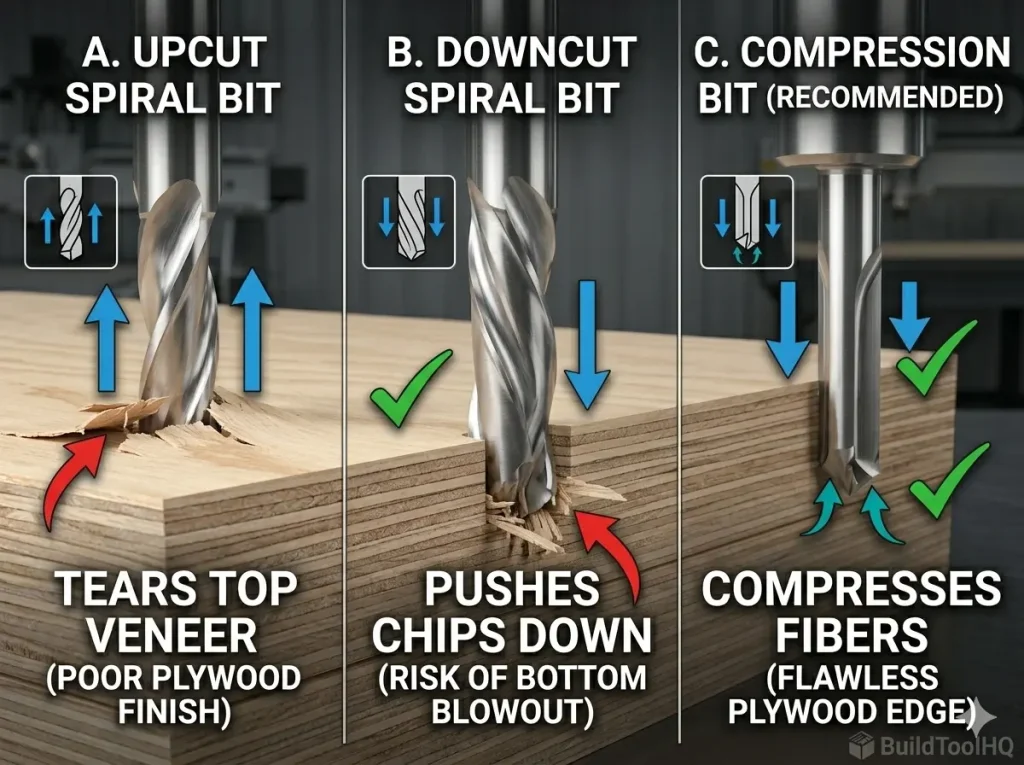
    Technical comparison of chip flow geometry for standard upcut, downcut, and compression CNC bits for plywood.
    Understanding the “why” behind the geometry: Standard bits either pull up or push down. Compression geometry (C) uniquely shears in both directions toward the center, protecting fragile plywood veneers from tear-out and blowout.

    Plywood is a “composite” material made of alternating layers of Plywood is a “composite” material made of alternating layers of wood grain and glue. This creates two distinct challenges for a CNC router that solid lumber does not present: inter-laminar shear and veneer fragility.

    1. Top-Layer Tear-out: The fragile veneer on the top surface is prone to lifting because it has no support from above.
    2. Bottom-Layer Splintering: As the bit exits the material, the downward force of the tool can blow out the bottom veneer.

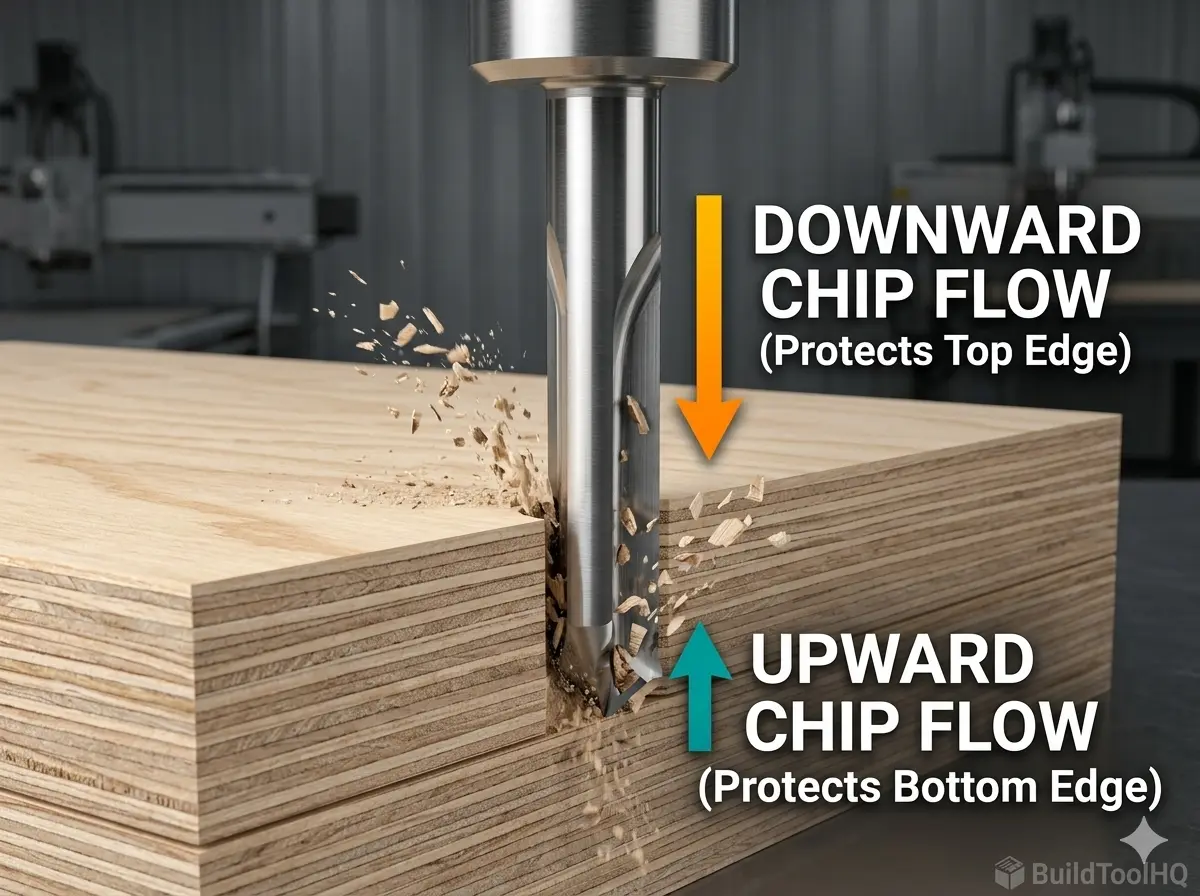
    Standard upcut bits act like a hook on plywood veneers, pulling them upward and away from the core. Conversely, a downcut bit protects the top but can cause “blowout” on the bottom as it pushes chips into the wasteboard. To solve this, we move toward Compression Geometry. If you haven’t seen the visual difference in action, check out our deep dive on [Upcut vs. Downcut vs. Compression Bits: When to use each for edge finish].


    2. Top Recommendations for the Best CNC Bits for Plywood

    For high-volume production or high-end cabinetry, these three tools are essential in your kit to ensure a zero-sanding finish.

    A. The Compression Bit (The Gold Standard)

    This is the undisputed king of plywood. By combining an upcut tip with a downcut shank, it “compresses” the wood fibers toward the center of the board.

    • The Secret: It creates a “shearing” action from both the top and the bottom simultaneously. This results in a “butter-smooth” edge that is ready for edge-banding immediately after the cut.

    B. The Mortise Compression Bit (For Thin Sheets)

    Standard compression bits often have an upcut section (the “toe”) that is too long for $1/4″$ ($6mm$) or $12mm$ plywood. This causes the upcut portion to reach the top surface, causing the very tear-out you were trying to avoid.

    • The Solution: A Mortise Compression bit has a significantly shorter upcut section (usually around $3mm$ to $5mm$). This allows the downcut portion of the bit to engage the top veneer even on thin material.

    C. The Straight Flute Bit (The Cost-Effective Workhorse)

    While spiral flutes are popular for high-speed clearing, straight flute bits are excellent for plywood because they exert zero vertical force. They don’t pull up, and they don’t push down. While they struggle with chip evacuation compared to [O-Flute Bits for Plastics and Acrylics: Managing heat and preventing melting], they are a fantastic, budget-friendly choice for simple profile cuts and nesting.

    3. Mastering Hardwoods: Oak, Maple, and Walnut
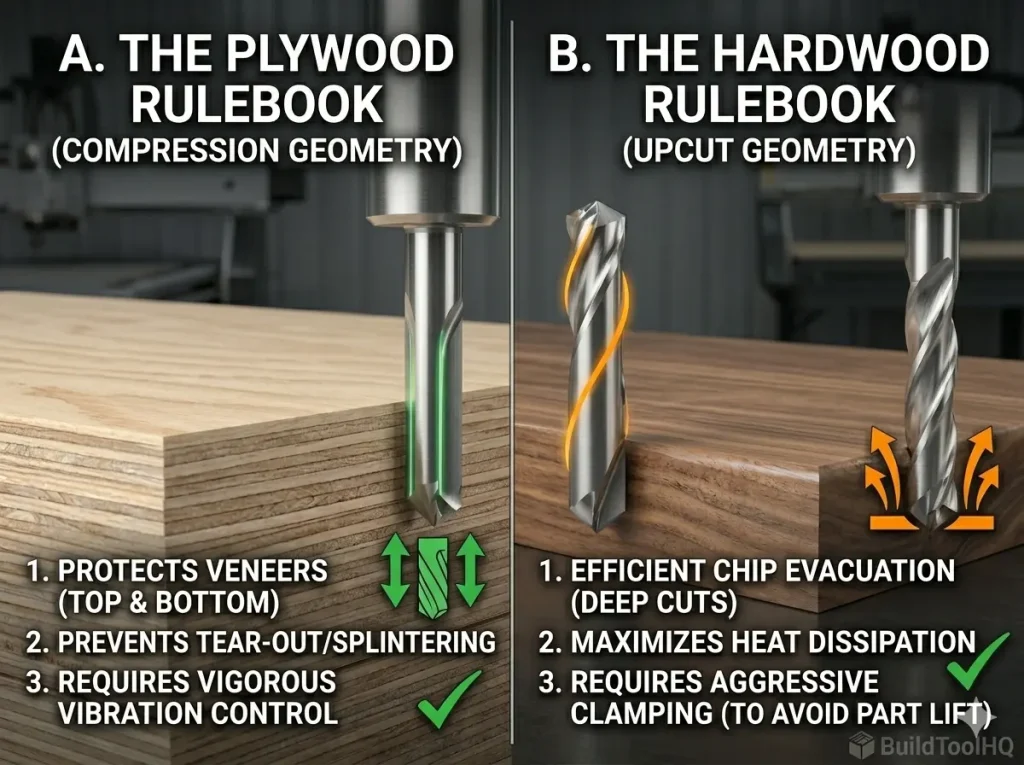
    CNC Router Bit selection rulebook comparing compression geometry for plywood and upcut geometry for hardwood.
    Understanding the material shift: Plywood (Left) demands compression geometry to safeguard delicate layers. Solid Hardwood (Right) prioritizes upcut spirals for heat management and rapid chip clearance—a trade-off that risks surface quality for tool life.

    While plywood requires compression to save the veneers, solid hardwoods demand heat management and grain awareness. Solid wood is a cellular structure, and the way your bit interacts with those cells determines your finish quality.

    Chip Evacuation in Deep Pockets

    When carving deep mortises in hardwood, heat is your primary enemy. An Upcut Spiral bit pulls chips out of the hole rapidly. This prevents the bit from “re-cutting” sawdust. Re-cutting chips is the primary cause of friction, which leads to tool burn and ruins the temper of your carbide.

    Roughing vs. Finishing Strategies

    For complex hardwood projects, we recommend a two-tool strategy:

    1. The Roughing Pass: Use a large $1/4″$ or $1/2″$ Upcut Spiral to clear bulk material quickly.
    2. The Finishing Pass: Use a [Ball Nose vs. Tapered Ball Nose: The nuances of 3D carving and finishing passes] bit to “clean up” the final $0.5mm$ of material for a glass-like finish.

    4. Nested Manufacturing: Maximizing Your Sheet Goods

    Not every wood project is a simple square cut. Depending on your design, you may need to pivot to specialized tools:


    5. Technical Diagnostic: Troubleshooting Your Wood Cuts

    If you are seeing poor results, use this checklist to diagnose the issue:

    Bit “Screaming”? This is often a sign of tool deflection or a chip load that is too small. Re-check your math in the [The Ultimate Guide to CNC Router Bits: Selection, Speeds, and Materials].

    Burning on Hardwood? Your feed rate is too slow. The bit is rubbing instead of cutting. This is common when using the same speeds for wood as you would for [Aluminum Cutting with CNC: Single-flute secrets and lubrication]. You must increase your IPM (Inches Per Minute) to keep the carbide cool.

    Fuzzing on Plywood Top? Your upcut “toe” is reaching the top surface. Switch to a Mortise Compression bit or increase your depth of cut on the first pass.


    6. Maintenance: Protecting Your Carbide Investment

    Even the best bits will fail if they are covered in “pitch” (dried sap and resin). Pitch buildup increases friction, which increases heat, which kills the razor edge of your tool.

    • Clean After Every Run: Use a dedicated citrus-based cleaner or a blade-and-bit soak.
    • Check for “Blueing”: If your bit looks blue or rainbow-colored, it has overheated. This softens the carbide.
    • Storage: Carbide is brittle. If two bits “clink” together, the edges can micro-chip. For a full storage and cleaning protocol, see our guide on [CNC Bit Maintenance: Sharpening, cleaning, and storage for longevity].

    Final Summary for BuildToolHQ Readers

    Building a “topical authority” in your workshop means matching thBuilding a “topical authority” in your workshop means matching the tool to the fiber:

    • For Cabinetry & Plywood: Invest in a high-quality $1/4″$ Compression bit.
    • For Solid Hardwood Furniture: Use Upcut Spirals for bulk removal and Ball Nose for detail.
    • For Thin Veneered Panels: Always reach for the Mortise Compression.

    By understanding wood-specific geometry, you drastically reduce your post-processing time. Remember: Five minutes of tool selection saves five hours of sanding.

    Can I use a compression bit for every plywood cut?

    While compression bits are the gold standard, they have a “minimum depth” requirement. For the compression effect to work, the upcut portion (the tip) must be fully buried in the material so the downcut portion can engage the top veneer. If you are doing shallow decorative grooves, a compression bit will act like an upcut bit and cause tear-out. For shallow work, reach for a dedicated downcut spiral.

    Why does my hardwood keep burning even with a sharp bit?

    Burning is usually a symptom of a low chip load. If your RPM is too high and your feed rate is too slow, the bit “rubs” the wood fibers instead of slicing them. This friction generates heat that chars the wood.
    The Solution: Increase your travel speed (IPM) or lower your spindle RPM. For the exact math, revisit our [The Ultimate Guide to CNC Router Bits: Selection, Speeds, and Materials].

    What is the difference between a “Mortise” compression and a standard one?

    A Mortise Compression bit has a much shorter upcut “toe” (usually $3mm$ to $5mm$). This is designed specifically for thin sheet goods ($1/4″$ or $1/2″$). If you use a standard compression bit on thin plywood, the upcut flutes will reach the top surface and splinter the veneer.

    Should I use a single-flute or double-flute bit for hardwood?

    For most woodworking, a two-flute bit is the standard as it provides a cleaner finish. However, if you are cutting extremely “gummy” woods or need to move very fast, a single-flute (similar to what we use in [Aluminum Cutting with CNC: Single-flute secrets and lubrication]) can help with heat dissipation.

    Is it okay to use “Downcut” bits for deep pockets in Oak or Maple?

    We generally advise against this. Because downcut bits push chips into the bottom of the cut, they can cause heat to build up rapidly in deep pockets, which may lead to smoke or even fire. For deep clearing in hardwoods, always use an upcut spiral to ensure chips are evacuated safely.

    How do I prevent “fuzzies” when cutting softwoods like Pine?

    Softwoods have long, flexible fibers that tend to bend rather than cut cleanly. Using a downcut bit is the best way to “trap” those fibers against the grain and shear them off. If you’re still seeing fuzz, ensure you aren’t using a bit meant for harder materials, like those found in [Diamond Coated & Specialized Bits: For composites and abrasive materials], as they may not be sharp enough for soft fibers.
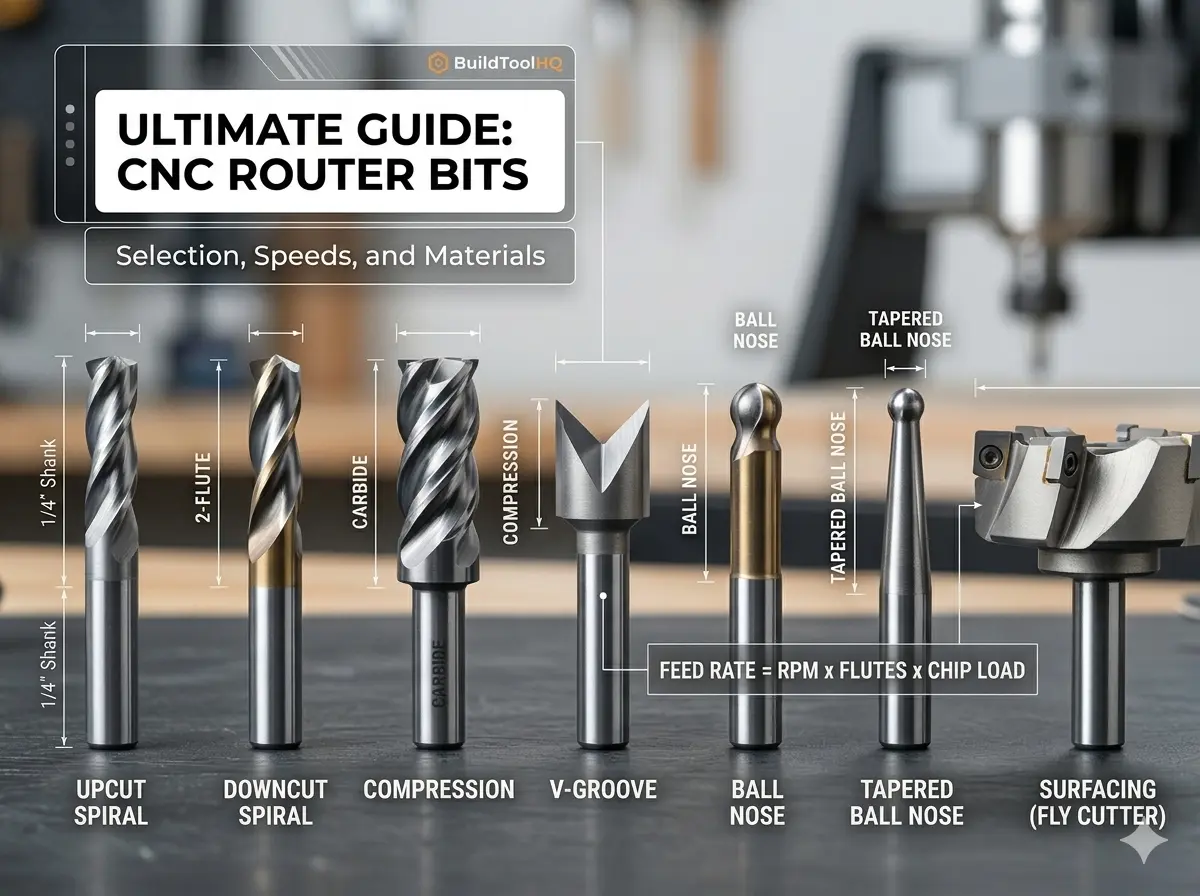
  • The Ultimate Guide to CNC Router Bits: Selection, Speeds, and Materials

    The Ultimate Guide to CNC Router Bits: Selection, Speeds, and Materials

    In the world of precision manufacturing, your CNC machine is only as capable as the few millimeters of carbide meeting the workpiece. For the BuildToolHQ community, understanding CNC router bits isn’t just about knowing which shape to buy—it’s about mastering the intersection of material science, geometry, and mechanical physics.

    Choosing the wrong CNC router bits doesn’t just result in a “bad cut.” It leads to workholding failure, shortened spindle life, and potentially dangerous tool breakage. This guide is designed to transform you from a “user” into a “technician,” covering everything from basic flute geometry to the advanced math of chip loads.

    1. Understanding CNC Router Bits: Anatomy, Shanks, and Flutes

    To master the CNC, you must first speak the language of the tool. Every bit is a balance of trade-offs between rigidity, chip clearance, and finish quality.

    The Shank: The Foundation of Rigidity

    The shank is the un-ground part of the router bits held by the collet. While standard sizes like $1/4″$ and $1/2″$ are ubiquitous, the physics of deflection are often overlooked.

    • The Rule of Rigidity: Tool deflection increases by the cube of the length it protrudes from the collet.
    • BuildToolHQ Advice: Always seat your router bits as deeply into the collet as possible (leaving just a tiny gap before the flutes start) to minimize vibration and “chatter.”

    Flute Count and Performance

    The flutes are the helical channels that evacuate waste.

    • Single Flute: These are the “secret weapon” for plastics and soft metals. Because there is only one cutting edge, you can run higher feed rates at lower RPMs, preventing the material from melting. Learn more about it here : (best CNC bit for cutting acrylic)
    • Two Flutes: The industry standard for woodworking They provide a balance between a high feed rate and a smooth finish.
    • Three or Four Flutes: Primarily used for finishing passes in hardwoods or machining non-ferrous metals like Aluminum. They offer a superior finish but require massive feed rates to avoid “rubbing.”

    2. Types of CNC Router Bits: Upcut, Downcut, and Compression

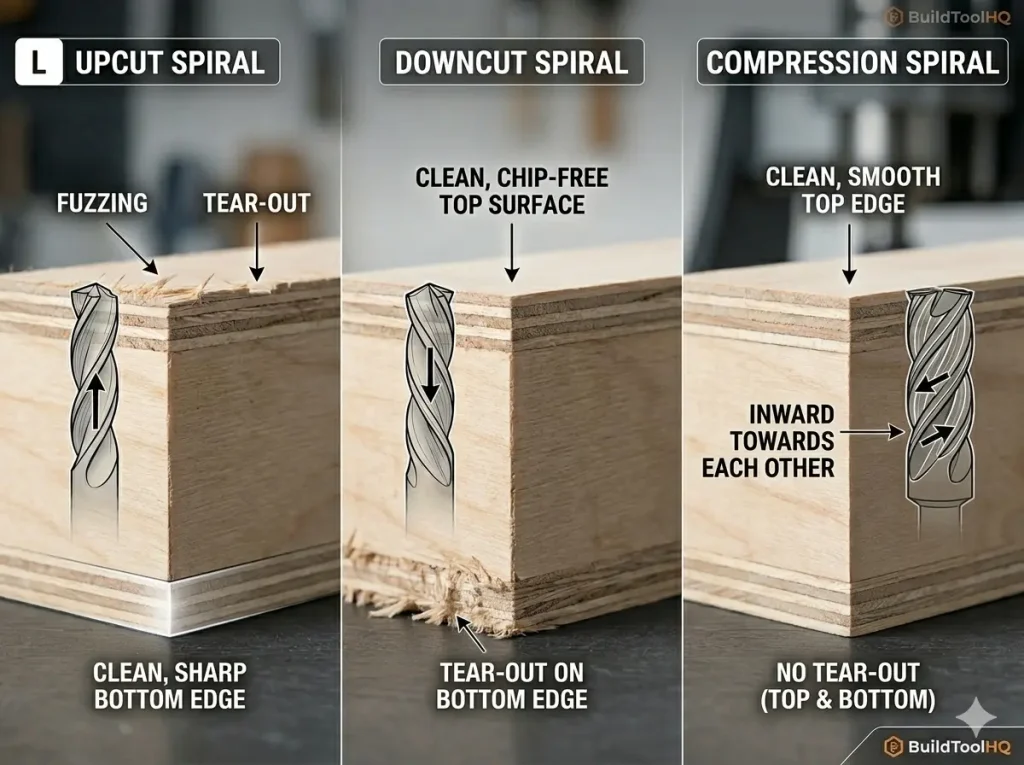
    CNC router bit comparison: Upcut vs Downcut vs Compression edge finish results on plywood
    Notice how the direction of the flutes (indicated by the arrows) dictates whether the tear-out occurs on the top or bottom of the workpiece

    The most frequent question we see is: “Which way should the chips go?” The answer depends entirely on your material’s “skin.” Selecting the right CNC router bits for the job requires understanding directional physics.

    Upcut CNC Router Bits: The Clearing Specialist

    Upcut bits pull chips toward the spindle.

    • Pros: Excellent chip evacuation; perfect for deep mortises or slotting.
    • Cons: They tend to lift the material and “fuzz” the top grain of plywood or veneers.

    Downcut CNC Router Bits: The Surface Master

    Downcut bits push chips into the cut.

    • Pros: They provide a perfectly clean top surface and help push the material down into the wasteboard.
    • Cons: They pack sawdust into the bottom of deep grooves, which can cause heat buildup in your CNC router bits.

    Compression CNC Router Bits: The Professional’s Choice

    A compression bit features a downcut spiral on the top and an upcut spiral on the very tip.

    • The Magic Moment: When the transition point is buried, the bit “sandwiches” the wood toward the center. This results in a “chip-free” edge on both the top and bottom of laminated sheets.

    Internal Resource: For a visual breakdown of these geometries, see our guide: [Upcut vs. Downcut vs. Compression Bits: A Visual Comparison].


    3. Material Science of CNC Router Bits: Carbide vs. HSS

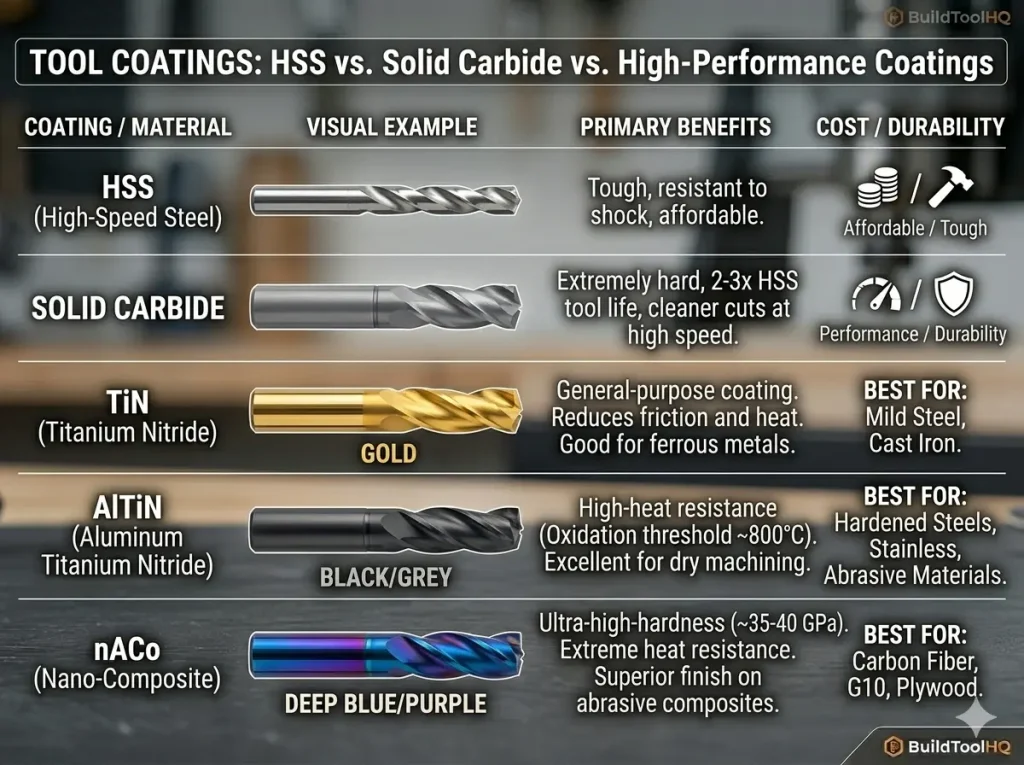
    CNC tool coatings comparison: HSS, Solid Carbide, TiN (Gold), AlTiN (Black), and nACo (Blue) end mills chart.
    This technical chart visually compares tool life and application best practices for standard HSS, Solid Carbide, and high-performance TiN, AlTiN, and nACo coatings.

    While High-Speed Steel (HSS) bits remain common in hand-held routing due to their lower price point, professional CNC operations almost exclusively demand Solid Carbide. According to technical standards for industrial tooling, carbide provides the extreme thermal stability required to withstand the high-speed friction generated by modern spindles.

    FeatureHigh-Speed Steel (HSS)Solid Carbide CNC Bits
    Heat ResistanceModerateExtreme
    Edge RetentionLowHigh (up to 50x longer)
    FlexibilityHigher (Vibration dampening)Low (Brittle/Rigid)
    Best ForSoftwoods / Short runsHardwoods, Composites, Metals

    At BuildToolHQ, we always recommend investing in high-quality carbide CNC router bits. While the initial cost is higher, the “cost per linear foot of cut” is significantly lower because carbide maintains a razor-sharp edge longer. This is especially critical when moving into high-performance fabrication; for example, standard carbide fails quickly in abrasive materials like carbon fiber or G10, requiring the elite durability found in our guide on ( diamond coated CNC bits ) And (aluminum cutting with CNC) guide.


    4. Calculating Chip Load for CNC Router Bits

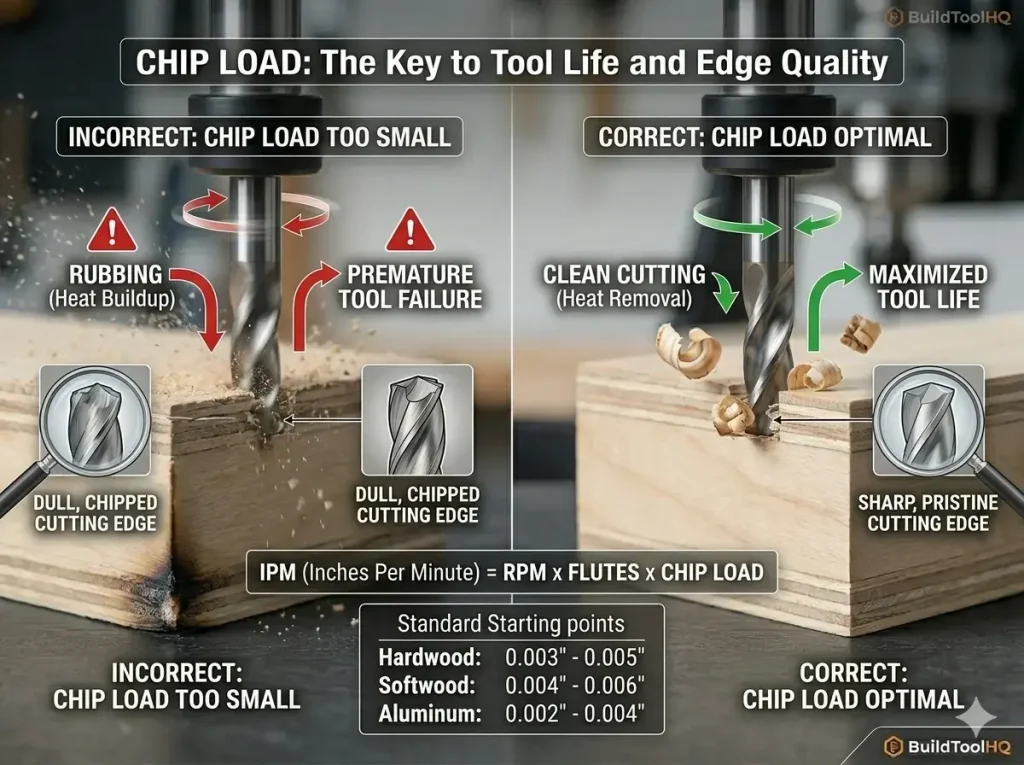
    CNC chip load comparison: Incorrect rubbing vs optimal chip load for tool life
    Proper chip load isn’t just about speed; it’s the primary way heat is removed from the cutting edge. Notice the flying chips on the right versus the burn marks on the left

    This is where most hobbyists fail and pros excel. If you hear your machine “screaming” or see smoke, your chip load is wrong, and you are killing your CNC router bits.

    Chip Load is the actual thickness of the chip each flute removes per revolution.

    • Too Small: The bit “rubs” the wood, causing friction heat that kills the tool’s temper.
    • Too Large: You risk snapping your CNC router bits or “missing steps” on your stepper motors.

    The Formula for Success

    Use this formula to calculate your starting points for any new CNC router bits:

    $$Feed\ Rate\ (IPM) = RPM \times Number\ of\ Flutes \times Chip\ Load$$

    Target Technical Specs:

    • Hardwood: $0.003″ – 0.005″$ chip load.
    • Softwood: $0.004″ – 0.006″$ chip load.
    • Aluminum: $0.002″ – 0.004″$ chip load.

    5. Specialty CNC Router Bits for Precision Tasks

    A well-stocked workshop needs more than just end mills. Specialized CNC router bits allow for complex 3D geometry and professional sign-making.

    V-Carve Bits and Sign Making

    Used for “V-carving” text and intricate patterns. The angle (usually $60°$ or $90°$) determines the depth and detail of the carve.

    Ball Nose vs. Tapered Ball Nose

    Essential for 3D contouring and organic shapes. The tapered variety offers the detail of a small radius with the strength of a thicker shank, making them some of the most versatile CNC router bits in your drawer.

    Slab Leveling and Surfacing

    If you are working with live-edge slabs, these wide-diameter CNC router bits are your best friend. They often feature replaceable carbide inserts for cost-effectiveness.


    6. Best Practices for CNC Router Bits Maintenance

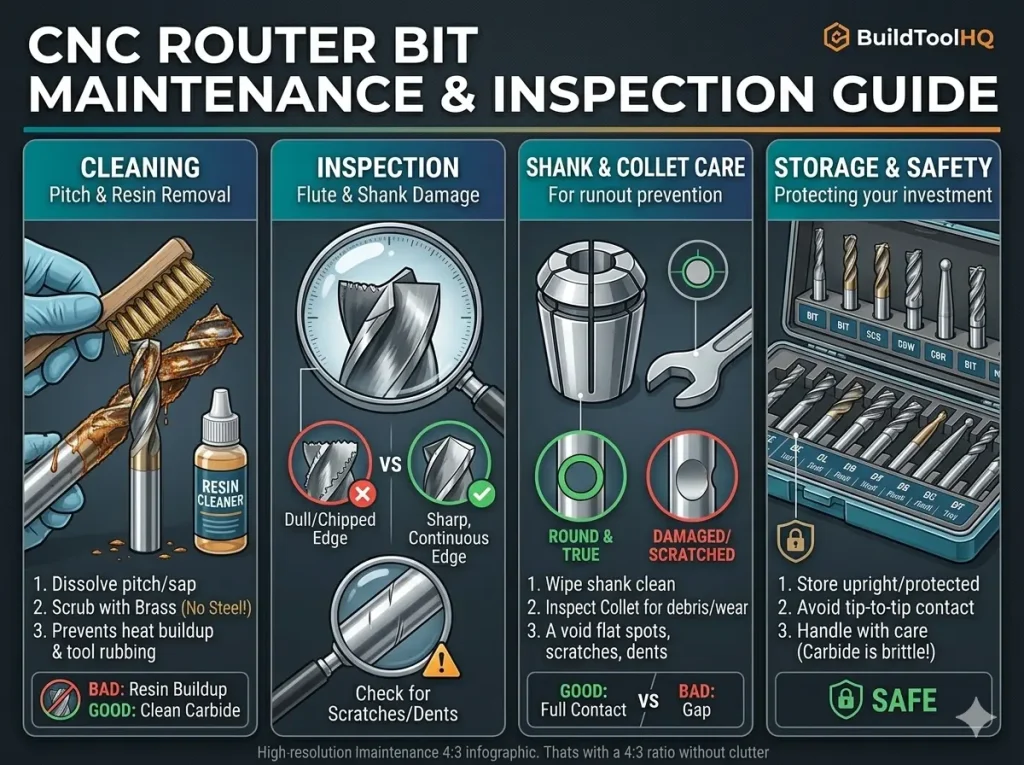
    CNC router bit maintenance guide: cleaning pitch, inspecting flutes, collet care, and safe storage
    Regular inspection and proper maintenance are key to ensuring safe cuts and maximizing the life of your expensive CNC tooling investment

    A dull bit is a dangerous bit. To make your CNC router bits last, you must manage “Pitch” and heat.

    1. The Solvent Soak: After cutting resinous woods like Pine, soak your CNC router bits in a pitch remover. Resin acts as an insulator, keeping heat trapped in the carbide cutting edge.
    2. Collet Cleaning: A dirty collet introduces Runout (the bit spinning slightly off-center). Even $0.001″$ of runout can significantly reduce the life of your CNC router bits.
    3. Storage: Never let carbide CNC router bits touch each other. Use a dedicated bit tray or the original plastic packaging.

    Internal Resource: See our step-by-step on [CNC Bit Maintenance: Cleaning and Sharpening].


    New to CNC and overwhelmed by bit choices? These 5 essential CNC bits will help you achieve cleaner cuts, reduce tear-out, and maximize efficiency without wasting money on unnecessary tools. Whether you’re cutting wood, engraving, or surfacing, this guide covers the best CNC bits for beginners

    7. FAQ: Common Questions About CNC Router Bits


    Why is my bit burning the wood?

    Burning is almost always caused by an RPM that is too high for your Feed Rate. Increase your speed or lower your RPM to help your CNC router bits carry the heat away in the chips.

    When should I replace my CNC router bits?

    If you notice increased noise, visible burning, or a “fuzzy” finish that wasn’t there before, your bit is likely dull. If you have to slow down your feed rate to get a clean cut, it’s time for new tooling.

    How many flutes do I need for Aluminum?

    Always start with a single-flute O-flute. Aluminum is “gummy” and likes to stick to the tool; a single flute gives the chip plenty of room to escape.

    Final Thoughts for the BuildToolHQ Community

    Mastering CNC router bits is a journey of trial and error, but starting with the right technical knowledge puts you miles ahead of the competition. By matching your bit geometry to your material and dialing in your chip load, you’ll achieve the professional results your projects deserve.

    Explore our specialized cluster posts to master every specific material in your shop.